PDP-8/I · Volume 12
PDP-8/I — Volume 12 — Surviving Machines, SIMH & Museums
How a fifty-year-old twelve-bit computer is kept alive on three fronts at once — in iron, by the restorers who coax dead core and brittle flip-chips back to life; in software, by a simulator faithful enough to boot the real operating system; and in paper, by the volunteers who scanned the very manuals this series was written from.
12.1 About This Volume
For eleven volumes this series has looked backward. It built the PDP-8/I up from its cores and flip-chips (Volumes 4 through 7), traced the family across fifteen years of re-implementation (Volume 3), followed the little computer out into the labs and clinics and classrooms where it earned its living (Volume 10), and finally stepped back to argue what the whole machine meant (Volume 11). All of that was history — the account of a thing that happened and ended. This volume turns the camera around. It is about the present tense: about the people, projects, and institutions that, right now, in 2026, are keeping a fifty-eight-year-old minicomputer architecture from disappearing.
That work happens on three fronts, and the volume is organized around them because the three are genuinely different kinds of preservation. There is the hardware — actual PDP-8s, including 8/I units, that survive in private hands and collections, kept running by a small, devoted restoration community against the steady decay of core memory, aging capacitors, and tired Teletypes. There is the software — chiefly SIMH, the simulator faithful enough to boot the real OS/8 on a modern laptop, the reference preservation of the architecture as executable behavior. And there is the documentation — bitsavers.org and the paper-tape image archives, the scanned manuals and loader images that this very series leaned on at every step. Hardware, emulation, paper: three answers to the same question, how do you keep a machine alive after the company that built it is gone? This volume is also a hinge. Everything it describes — especially the simulator — is the soil out of which the modern replicas grow, and so it sets up Volume 13 (the replica revival) and Volume 14 (Jeff’s own build). The machines that follow stand on the preservation work described here.
12.2 Surviving iron: the machines that still run
Begin with the most surprising fact, because it is easy to assume otherwise: real PDP-8s still exist, and a meaningful number of them still run. The architecture was manufactured in enormous quantity — on the order of fifty thousand classic PDP-8 minicomputers across the family (Volume 10), and many were rugged, industrial machines built to sit in a factory or a lab for a decade. They did not all go to the scrapper. Thousands survive in the hands of private collectors, hobbyist restorers, university back rooms, and museums, and a determined subculture keeps a good fraction of those survivors in working order — toggling programs into the front panel, spinning paper tape, booting OS/8 — not as a performance but as a routine.
Keeping a half-century-old computer alive is, however, a fight against several distinct kinds of decay, and the PDP-8 restorer learns to recognize each. The most characteristic enemy is the machine’s own core memory. Magnetic-core storage (Volume 4) is remarkably durable in one sense — it is non-volatile, holding its bits with no power, which is why a restored PDP-8 can often be switched on to find the last program it ran still sitting in memory decades later. But the electronics around the core — the sense amplifiers, the inhibit and drive lines, the delicate analog timing that reads a few millivolts off a hair-thin wire threaded through a ferrite bead — are fussy, and a single broken wire in a hand-strung core plane is a near-unrepairable wound. Then there are the flip-chip modules themselves (Volume 5), the small circuit cards that are the computer: their gold-plated edge connectors tarnish and lose contact, their early germanium and silicon transistors occasionally fail, and a machine with hundreds of cards is a machine with hundreds of intermittent-contact suspects. The power supplies age in the way all vintage electronics age — the electrolytic capacitors dry out and drift or short, and a restorer’s first rule is often to bring an old supply up slowly on a variac and replace the big filter caps before trusting it with the logic. And the ASR-33 Teletype (Volume 8), the machine’s classic console, is its own restoration project: a wonderfully complex electromechanical printer-keyboard-reader full of cams, clutches, contacts, and decades-old lubricant gone to varnish, often harder to keep running than the computer it serves.
The community that does this work is small, knowledgeable, and generous with what it learns, and the public face of the PDP-8 side of it is David Gesswein’s pdp8online.com. The site — long-running and still up — documents Gesswein’s own machines in extraordinary detail, including a Straight-8 and a PDP-8/I, down to photographs of the individual processor and core-memory cards, and it has hosted, at times, a genuinely live PDP-8 that visitors could run remotely over the web. It is also a reference library for the practical knowledge restoration requires: how PDP-8 core memory actually works, how the mass-storage peripherals are wired, how a specific machine was disassembled, de-rusted, and brought back electrically (some of that work done with fellow restorer Corey Cohen and the MARCH / vintage-computing-club community). Around sites like Gesswein’s sits a wider scene — the classiccmp and vintage-computer-forum mailing lists and boards, the regular Vintage Computer Festival events where these machines are shown and swapped, and a loose network of collectors who trade modules, share scanned schematics, and talk one another through repairs.
A word of caution about superlatives is in order, and the restoration community itself tends to be careful here: claims of the form “the only working PDP-8 in the world” or “the last running 8/I” should be treated skeptically. Survivorship is poorly catalogued, machines move between private hands quietly, and a unit listed as dead one year may be running the next after a capacitor swap. What can be said confidently is the modest, true version: multiple PDP-8s of various models are kept in running order by multiple independent restorers and institutions, and the number is small but plural. The honest claim is not uniqueness but persistence.
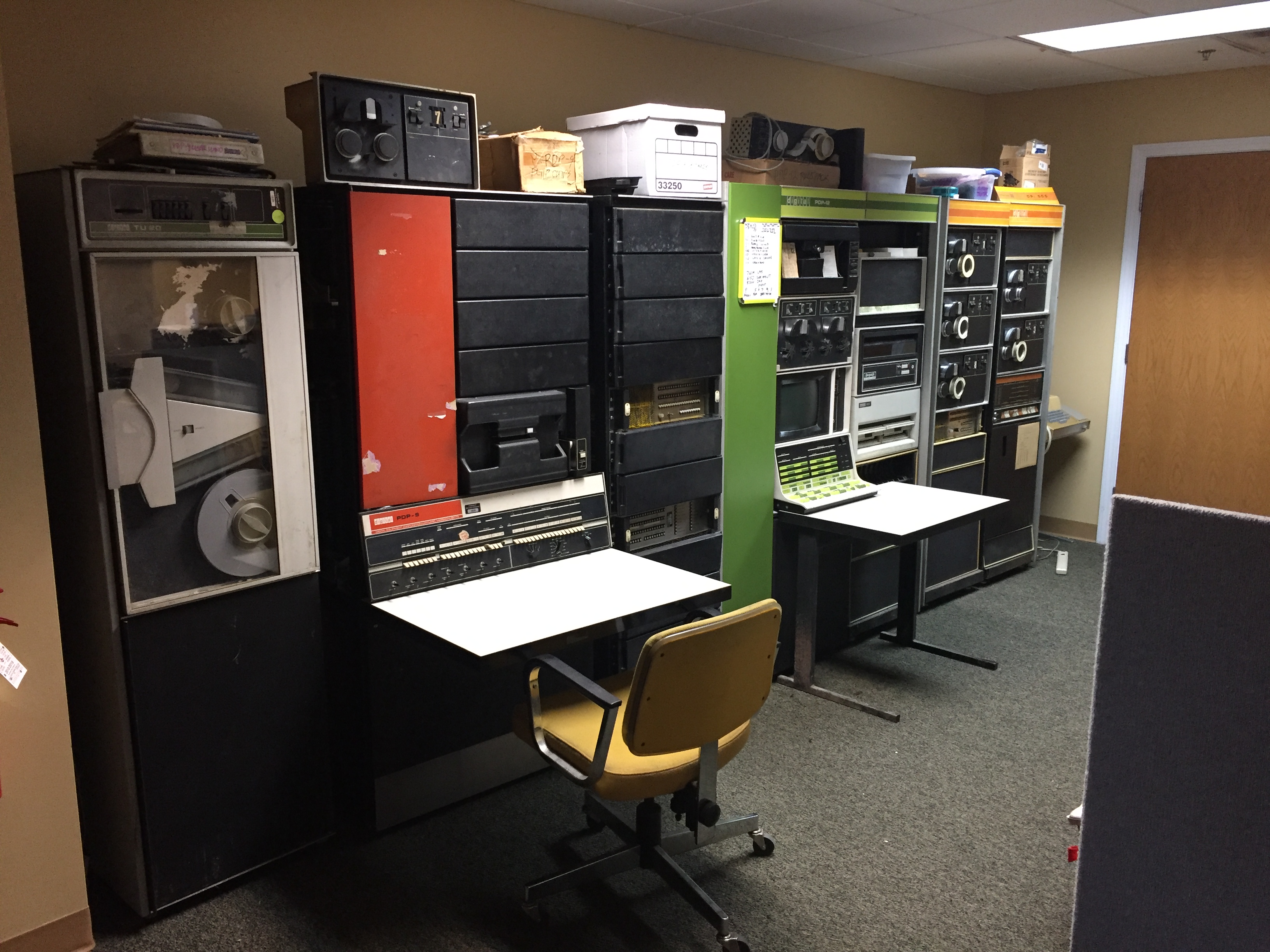
12.3 Where to see one: the museums
For the visitor who simply wants to stand in front of a real PDP-8, the surest places are the museums — and they matter for a reason an emulator can never address. A simulator can reproduce every bit of the machine’s behavior and still leave you with no sense of the object: the height of the cabinet, the heft of a flip-chip drawer, the specific industrial blue of a DEC console, the genuine size of the thing that the word “mini” once described as small. Seeing the panel-and-cabinet artifact at full scale supplies the physical understanding that this whole series has been trying to convey in words.
In the United States, the anchor institution is the Computer History Museum (CHM) in Mountain View, California — the largest museum of its kind, holding tens of thousands of artifacts, and home to the DEC PDP-8 as part of its major permanent exhibition on the history of computing (the long “Revolution” galleries that run from the abacus to the internet). CHM is doubly important to this story because, as we will see, the museum is institutionally entwined with the documentation side of preservation as well.
The most poignant entry in any present-day museum list is one that has to be written carefully, because it is a recent loss. Living Computers: Museum + Labs in Seattle — the institution founded by Microsoft co-founder Paul Allen, and famous precisely for keeping vintage machines running and interactively usable rather than merely displayed behind glass — has closed permanently. It suspended operations in early 2020 during the pandemic and never reopened; following Allen’s death, his estate confirmed the permanent closure in 2024, and a portion of the collection was sold at auction (through Christie’s) while other artifacts were transferred to other institutions. This is worth stating plainly and accurately because Living Computers was, for years, the place one would have recommended first to anyone who wanted to touch a working historic computer, and it is no longer an option. Its closure is a real subtraction from the preservation landscape, and a reminder that even well-funded institutions are not permanent. (Some of the museum’s online interactive-access spirit was reportedly carried forward by community hosts, but the Seattle museum itself is gone.)
Across the Atlantic, the strongest destination is The National Museum of Computing (TNMOC), on the Bletchley Park site in Milton Keynes, England — home to the world’s largest collection of working historic computers, from rebuilt wartime Colossus and Bombe machines forward. TNMOC’s holdings have included a PDP-8 among the earliest machines on display, shown in the museum’s hands-on, keep-it-running tradition. Beyond these anchors, PDP-8s and their siblings turn up in regional and volunteer-run collections on both continents — the Rhode Island Computer Museum (RICM) pictured above among them, with its PDP-8, PDP-9, and PDP-12 line-up — and in the System Source museum, the Vintage Computer Federation’s collections, and various European technical museums. The map of where to see a PDP-8 is, encouragingly, not a single point but a scatter; the discouraging caveat is only that any specific institution’s hours, holdings, and very existence should be checked before a visit, because — as Living Computers shows — the landscape shifts.
12.4 SIMH: the architecture preserved as software
If the hardware survives by the heroics of individuals, the architecture — the logical machine, independent of any one physical box — survives most completely as a piece of software called SIMH, the Computer History Simulation project. SIMH was begun by Bob Supnik, a DEC engineer, and grown over decades with contributions from many hands, with one explicit goal: to preserve historic software by faithfully simulating the hardware it ran on, so that old programs can still be executed and experienced rather than merely read about. It is not a PDP-8 emulator narrowly; it is a portable framework that simulates a remarkable roster of historic architectures — DEC’s PDP-1, PDP-4, PDP-7, PDP-8, PDP-9, PDP-10, PDP-11, and PDP-15, the VAX, plus many non-DEC machines — all from the same code base, on ordinary modern computers running Windows, macOS, or Linux.
For the PDP-8 specifically, SIMH does the thing that matters most: it models the machine completely enough to be useful as the real thing. It implements the twelve-bit instruction set (Volume 6) — the memory-reference instructions, the microcoded operate group, the IOT device instructions — and it simulates the peripherals as well: the paper-tape reader and punch, the Teletype console, and the mass-storage devices (DECtape, the RK-series disks, and more) as host files. Because the peripherals are simulated, their media become ordinary files: a paper-tape image is just a file of bytes, a disk pack is just a file. You hand SIMH a binary paper-tape image of the RIM or BIN loader (Volume 9), or an OS/8 disk image, and the simulated machine boots it exactly as the iron would. The upshot is concrete and a little astonishing: on a laptop, with free software and a few downloaded image files, you can today boot OS/8, run FOCAL or BASIC, write and assemble PDP-8 programs, and watch the same operating system the real machine ran come up on a simulated console. SIMH is, in the most literal sense, the reference preservation of the PDP-8 as a working logical machine — the architecture itself, kept executable.
SIMH also has a small piece of present-day governance history worth getting right, because it bears on which project to point people at. The long-standing code base was, for years, maintained on GitHub under the original simh project. In 2022, the community established the Open SIMH project (opensimh.org, the open-simh organization on GitHub) as a community-governed continuation; its code base was taken from the then-current maintained source as of 12 May 2022 and carried forward under open community stewardship. Both the “classic” SIMH and Open SIMH lineages exist, and the practical guidance for a newcomer in 2026 is simply to start from the Open SIMH project as the actively community-governed home of the simulators. The governance detail matters less than the durable point: SIMH is mature, faithful, freely available, and actively maintained, and it is the software in which the PDP-8 is most completely and permanently preserved.
That point also reaches forward into the rest of this series. SIMH is not only a museum piece in its own right; it is the engine underneath the modern replicas. The PiDP-8/I — the Raspberry-Pi-driven replica at the center of Volume 13, and the basis of Jeff’s build in Volume 14 — does not re-implement the PDP-8 from scratch in its own software. It drives a real SIMH PDP-8 simulation underneath a physical, blinking front panel. When you toggle a switch on a PiDP-8/I, you are, in the end, poking a SIMH register. So the simulator described here is the connective tissue between the surviving history of this volume and the living replicas of the two that follow.
12.5 Paper into bits: bitsavers and the document archives
A running machine and a faithful simulator are both, in the end, useless without one more thing: the knowledge of how to operate them — the manuals, the loaders, the program listings, the maintenance procedures. This series itself is the proof of the point. Nearly every technical claim in Volumes 4 through 9 traces back to a DEC document — a maintenance manual, a Small Computer Handbook, a programming reference — and the reason those documents were available to consult, decades after DEC stopped printing them, is the patient work of the document-preservation community, above all bitsavers.org.
bitsavers is a preservation archive of vintage-computer documentation and software, run principally by Al Kossow, who is the software librarian at the Computer History Museum — the institutional and the volunteer sides of preservation joined in one person. Since the 1990s, the bitsavers effort has scanned an enormous body of computer-related paper: by now thousands of documents running to millions of pages, hand-scanned from originals donated or loaned by collectors, and made freely downloadable (mirrored widely, including through the Internet Archive). For the PDP-8 the holdings are deep — the early PDP-8 Maintenance Manual and Users Handbook from 1965–66, the PDP-8/I and 8/E manuals, module and core-memory references, software listings — the precise corpus this deep dive was built on. Without bitsavers, much of what this series explains would have had to be reconstructed from memory and rumor; with it, the primary sources are a download away.
The software side of document preservation runs in parallel and feeds directly into the emulation story above. PDP-8 programs survive today as image files: paper-tape images of the RIM and BIN loaders (Volume 9) and of FOCAL, BASIC, and diagnostics; OS/8 disk images; DECtape images — the bits lifted off rapidly decaying physical media before that media failed for good. These images are exactly what SIMH consumes, which is why the document-and-software archives and the simulator are two halves of one preservation system: the archivists rescue the bits, the simulator runs them. The bootstrap loaders this series spent a whole volume explaining, the OS/8 operating system, the FOCAL interpreter — all of them now exist as files, copyable without loss, and that is the form in which they will outlast every surviving piece of iron. Paper rots, ferrite cracks, capacitors dry out; a well-mirrored file does not.
12.6 Why preserve a twelve-bit machine at all
Step back, finally, and ask the question underneath all of this: why bother? Why should anyone spend a weekend re-stringing a sense line, or maintain a simulator for a fifty-year-old instruction set, or hand-scan a thousand pages of a manual for a computer no one will ever again use to do real work? The honest answer is that the three preservation efforts in this volume each save something the others cannot, and together they save something worth saving.
The hardware preserves the object — the irreducible physical fact of the machine, its scale and weight and the specific way its lamps flicker, which no description or simulation fully conveys. The emulation preserves the behavior — the architecture as a living, runnable logic, so that anyone, anywhere, with no rare iron at all, can boot the real software and learn the machine by doing, exactly as the interactive PDP-8 always invited (Volume 11). The documentation preserves the understanding — the explanations and procedures that turn a blinking panel from a mystery into a comprehensible mechanism, and that let the other two efforts continue at all. Lose the iron and you lose the artifact; lose the emulation and you lose hands-on access; lose the documents and the other two go dark, uninterpretable. All three together keep the PDP-8 not as a relic but as something a curious person in 2026 can still understand from the gate up.
And that, in the end, is the deepest reason. The PDP-8 sits at a moment in computing’s history when the whole machine is still humanly comprehensible — small enough that one person can hold the entire design in their head, from the core plane to the instruction decode to the front-panel switch, with nothing hidden inside a chip too complex to follow. Modern computers have long since passed beyond that threshold; no one understands a current processor end to end the way one person can understand a PDP-8. To keep this machine alive — in iron, in simulation, and in paper — is to keep open a window onto the foundations of computing, a place where the whole thing is still small enough to see. That is what museums, restorers, simulators, and archivists are really preserving: not nostalgia, but legibility — the rare chance to comprehend a real computer whole.
Which is exactly why the story does not end in a museum. The same impulse that keeps an original PDP-8 running, and keeps SIMH faithful, and keeps the manuals scanned, leads naturally to the next step: building one yourself. If the machine is small enough to understand, it is small enough to recreate — and a generation of replica builders, working from the very preservation efforts this volume describes, has done exactly that. The most successful of them, the PiDP-8/I — a faithful blinking front panel driving a SIMH PDP-8 underneath — is where this series goes next. Volume 13 tells the story of the replica revival; Volume 14 is Jeff’s own build of it. The preservation described here is the foundation they are built on.
Sources
- pdp8online.com (David Gesswein), “Online PDP-8 Home Page” and its PDP-8/I, Straight-8, and core-memory restoration pages — a long-running, still-active reference for PDP-8 hardware restoration, including the practical challenges of core memory, flip-chip modules, and disassembly/electrical refurbishment (some work done with Corey Cohen and the vintage-computing-club community). http://www.pdp8online.com/ · https://www.pdp8online.com/pdp8i/pics/pdp8icards.shtml · https://www.pdp8online.com/pdp8em/core.shtml
- The Open SIMH Project, “The Open SIMH Project” — the community-governed continuation of SIMH, with its code base taken from the then-maintained source as of 12 May 2022; and the original SIMH project begun by Bob Supnik, simulating the PDP-1/4/7/8/9/10/11/15, VAX, and many other architectures with the goal of preserving historic software by faithful hardware simulation. https://opensimh.org/ · https://github.com/open-simh/simh · https://github.com/simh/simh
- SIMH PDP-8 simulator (open-simh / simh,
PDP8directory) — the PDP-8 model implementing the instruction set and peripherals (paper tape, console Teletype, DECtape, RK disks, etc.) and able to boot OS/8 and run FOCAL/BASIC from paper-tape and disk images. https://github.com/simh/simh/tree/master/PDP8 - bitsavers.org (Al Kossow, software librarian at the Computer History Museum) — the vintage-computer documentation and software archive; the DEC PDP-8 holdings, including the 1965–66 PDP-8 Maintenance Manual and Users Handbook and later 8/I and 8/E manuals, that this series relied on. https://bitsavers.org/ · https://bitsavers.org/pdf/dec/pdp8/
- Wikipedia, “Computer History Museum” — the Mountain View, California museum; its scale (tens of thousands of artifacts) and the “Revolution: The First 2000 Years of Computing” permanent exhibition featuring the DEC PDP-8. https://en.wikipedia.org/wiki/Computer_History_Museum
- Wikipedia, “Living Computers: Museum + Labs”; GeekWire and The Seattle Times reporting — the Paul Allen–founded Seattle museum of working vintage computers; its suspension of operations in 2020 and the permanent closure confirmed by Allen’s estate in 2024, with the collection partly auctioned (Christie’s) and otherwise dispersed. https://en.wikipedia.org/wiki/Living_Computers:_Museum_%2B_Labs · https://www.geekwire.com/2024/fans-upset-by-closure-of-living-computers-question-why-seattle-museum-couldnt-be-saved/
- Wikipedia and tnmoc.org, “The National Museum of Computing” — the Bletchley Park museum, the world’s largest collection of working historic computers, whose displays of early machines have included a PDP-8. https://en.wikipedia.org/wiki/The_National_Museum_of_Computing · https://www.tnmoc.org/
- Rhode Island Computer Museum (RICM) — a volunteer-run collection holding DEC minicomputers including the PDP-8, PDP-9, and PDP-12 shown in this volume’s figure. https://commons.wikimedia.org/wiki/File:The_DEC_PDP-9,_PDP-12,_and_PDP-8_at_the_RICM.jpg
- This series, Volumes 4–10 — for the hardware this volume’s restorers contend with (core memory, flip-chip modules, the ASR-33 Teletype) and the software this volume’s archives preserve (the RIM/BIN loaders, OS/8, FOCAL); and Volume 11, for the interactive, hands-on ethos that preservation keeps alive. Volumes 13 and 14, to which this volume hands off, cover the replica revival and Jeff’s own PiDP-8/I build.
- Figure: “The DEC PDP-9, PDP-12, and PDP-8 at the RICM,” photograph by Sun-collector, via Wikimedia Commons, CC BY-SA 4.0. https://commons.wikimedia.org/wiki/File:The_DEC_PDP-9,_PDP-12,_and_PDP-8_at_the_RICM.jpg

Comments (0)