Altair 8800 · Volume 5
Altair 8800 — Volume 5 — The Bare Machine: Toggling in Programs, Reading the Lights
No keyboard, no screen, no storage, no software — just sixteen switches, a wall of red lamps, and the patience to spell a program out one bit at a time.
5.1 About This Volume
Volume 4 opened the cabinet and laid the architecture bare: a passive backplane of identical slots, an 8080 on a card, a hundred-pin bus, and a front panel of switches and lamps wired straight to that bus. It was a study of the machine as built — what the Altair 8800 is. This volume is about what it was like to use one.
That distinction matters more here than almost anywhere else in the series, because the gap between owning an Altair and doing anything with it was, in early 1975, enormous. You had unpacked the kit, or soldered it together over many evenings, or paid extra for the assembled unit; you had a working computer on the bench, its lamps glowing. And then you faced a problem that a modern reader has to work to even imagine: there was no way to tell it what to do. No keyboard to type on. No screen to read. No disk, no tape, no cartridge. No built-in software of any kind — not even a few bytes of start-up code in a chip. The machine came up filled with electrical noise and waited.
The only door into the machine was the front panel. The only way to put a program in was to set it, by hand, into memory — one byte at a time, each byte spelled out as a pattern of up-and-down toggle switches and pressed into a memory cell with a flick of a control switch. The only way to get an answer out was to read it off the rows of red LEDs. This volume teaches that craft: the exact toggle-in procedure, how to read and debug a running program from the lights, and — as the worked example every Altair owner remembers — how to enter and play Dean McDaniel’s tiny 1975 game Kill the Bit, the program that, for an entire generation, was the first thing they ever ran on a computer they owned. We close on why this slow, error-prone ritual mattered so much, and why it created an instant, burning demand for the better ways in — the Teletype, the paper tape, the BASIC of Volumes 6 through 8 — that would eventually free people from ever having to toggle again.
5.2 The bare-machine predicament
Begin with the honest inventory of a stock Altair 8800, because the constraint it imposes is the whole reason the rest of this volume exists.
You had an Intel 8080 running at 2 MHz — a genuine, capable microprocessor able to address sixty-four kilobytes of memory. You had 256 bytes of that memory actually fitted (Volume 4). You had a front panel. And that was the entirety of the machine. There was no keyboard, because a keyboard is an input device that plugs into an interface board, and the base machine had no interface board and nothing to plug a keyboard into. There was no display — no monitor, no terminal, not even a single seven-segment digit — for exactly the same reason. There was no mass storage: no disk drive, no cassette recorder, no paper-tape reader, nothing that could hold a program while the power was off. And, most consequentially of all, there was no ROM — no read-only memory carrying a monitor, a bootstrap loader, or any built-in software whatsoever. A machine with a ROM monitor can be talked to: switch it on and a small resident program is already running, ready to accept commands. The Altair had nothing of the kind. Switch it on and the processor began executing whatever random bytes happened to be sitting in its volatile memory — which, on a cold start, was gibberish.
This is the bare-machine predicament, and it is a genuine chicken-and-egg trap. To load a program conveniently you need software already running — a loader. To get that loader into the machine you need… to load it. With no ROM to break the cycle, the only tool that could reach into a fresh Altair and place the very first instruction in memory was the front panel: the sixteen switches and the handful of control toggles, operating directly on the bus, below the level of any software at all. The panel was not a debugging luxury or a nostalgic flourish. On the bare machine it was the sole, irreducible means of getting anything in or out. Every Altair program in the world — including the famous Altair BASIC, forty thousand bytes of it — had to begin with a human being toggling in, by hand, a short bootstrap loader: a few dozen bytes of machine code whose only job was to read the rest of the program in from a paper tape, once you had finally bought the interface board and the Teletype to do it. But that is Volume 6’s story. Here we are at the very bottom, with nothing but the switches.
What did “using the computer” feel like, then, in February of 1975? It felt like standing in front of a blue steel box, holding a hand-written sheet of octal numbers, and flipping switches. You read a byte off your listing. You set eight switches to match its bits. You pressed a switch to store it. You read the next byte. You set eight switches. You pressed again. You did this dozens, sometimes hundreds, of times, in a state of total concentration, because a single wrong switch anywhere in the sequence would, when you finally ran the program, produce not a helpful error message but silence, or a frozen pattern of lights, or a crash — with no clue as to where among your hundred hand-entered bytes the mistake lay. And when you switched the machine off, all of it — every byte of that painstaking labour — evaporated, because the memory was volatile and there was nowhere to save it. Next session, you toggled it in again. That was personal computing in early 1975. It was, by any reasonable standard, an absurd amount of work for very little. People did it anyway, in their thousands, and many of them describe it as one of the most thrilling things they ever did, because the machine was theirs and it was obeying them.
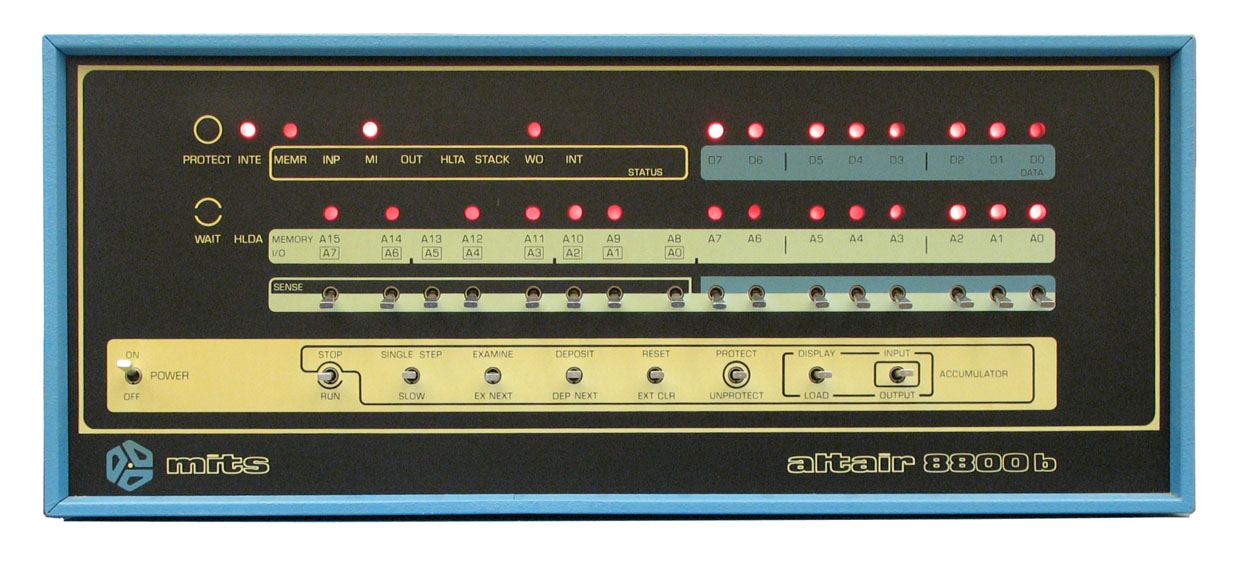
5.3 Entering a program by hand
The toggle-in procedure is a small, fixed ritual, and once learned it becomes almost mechanical — which is both its mercy and its danger, since a mechanical flow of the hands is exactly where a slipped switch hides. Let us set down the vocabulary first, then the procedure.
The lower row of the panel carries sixteen address/data switches, labelled A15 at the left down to A0 at the right, each thrown up for a one or down for a zero. They serve two distinct purposes depending on what you are about to do. When you are naming a memory address, all sixteen matter — sixteen bits is exactly the width of the 8080’s address bus, enough to point at any of the 65,536 cells. When you are entering a byte of data, only the rightmost eight switches (A7–A0) are read; those lower eight switches are the data register. The control switches to the left are spring-loaded, each rocking up or down to invoke one of two related functions: EXAMINE / EXAMINE NEXT, DEPOSIT / DEPOSIT NEXT, SINGLE STEP (with a SLOW variant on later panels), RESET / CLR, STOP / RUN, and PROTECT / UNPROTECT.
Three of these do the actual work of loading memory, and their roles must be kept straight:
- EXAMINE takes the 16-bit value you have set in the address switches, loads it into the processor’s address register, and shows you the byte currently stored there on the eight data LEDs. EXAMINE sets the address — it is how you tell the machine where you are about to work.
- DEPOSIT writes the byte from the lower eight switches into the cell at the current address. DEPOSIT writes.
- DEPOSIT NEXT first advances the address by one, then writes the switch byte there. This auto-increment is the whole trick that makes hand-loading bearable: you do not re-enter the address for every byte. You EXAMINE once to land on your starting address and DEPOSIT the first byte; thereafter every byte is just set the switches, DEPOSIT NEXT, and the machine walks forward through consecutive memory for you. (Its read-only twin, EXAMINE NEXT, advances and shows — the tool for proofreading, below.)
Here is the procedure as a step list, the way it would have been written on a hobbyist’s worksheet. Suppose the program starts at address 0 (octal 000 000):
    TOGGLING A PROGRAM INTO A BARE ALTAIR 8800
    ------------------------------------------------------------
    0.  Power on. Actuate RESET.            ; program counter -> 0,
                                            ; a clean known state.

    --- choose the starting address ---
    1.  Set the 16 ADDRESS switches to the
        program's start address (all DOWN
        for address 0).
    2.  Raise EXAMINE.                      ; address register := switches;
                                            ; the ADDRESS lamps now show it,
                                            ; the DATA lamps show what's there.

    --- enter the bytes, in order ---
    3.  Set the LOWER 8 switches (A7..A0)
        to the bits of the FIRST byte.
    4.  Raise DEPOSIT.                      ; writes that byte at the
                                            ; current address. DATA lamps
                                            ; echo what you just stored.

    5.  Set the lower 8 switches to the
        NEXT byte.
    6.  Raise DEPOSIT NEXT.                 ; address += 1, THEN write.
    7.  Repeat steps 5-6 for every
        remaining byte, in sequence.

    --- (recommended) proofread ---
    8.  Re-enter the start address; EXAMINE.
    9.  Raise EXAMINE NEXT repeatedly,      ; walk forward through memory,
        checking each DATA-lamp pattern     ; comparing the lights to your
        against your listing.               ; written listing, byte by byte.

    --- run it ---
   10.  Re-enter the start address; EXAMINE.
   11.  (or simply actuate RESET to force
        the program counter back to 0.)
   12.  Raise RUN.                          ; the 8080 begins executing
                                            ; at the address you set.
   13.  Raise STOP to halt; inspect with
        EXAMINE.
A few details repay attention. First, the octal habit. The 8080 was, in this era, a creature of octal — its instruction set is laid out so that the eight bits of an opcode fall naturally into a 2-3-3 pattern that maps cleanly onto three octal digits, and the Altair’s panel reinforces the habit by grouping its switches and lamps visually in threes. An Altair programmer reading a byte off a listing did not usually think “binary 1100 0011”; they thought “303” (octal), saw the three little clusters of switches, and threw them 11 — 000 — 011. Working in octal turned an unmanageable string of eight bits into three small, memorable digits, and very nearly every published Altair listing — Kill the Bit included — is given in octal for exactly that reason.
Second, the difference between DEPOSIT and DEPOSIT NEXT is the difference between a tolerable afternoon and an intolerable one. Without the auto-increment you would re-enter a full 16-bit address before every single byte; with it, the address takes care of itself and your attention stays on the data. Get into the rhythm — switches, DEPOSIT NEXT, switches, DEPOSIT NEXT — and a short program flows in surprisingly quickly. The rhythm is also, as noted, exactly where errors creep in, which is why the proofreading pass with EXAMINE NEXT (steps 8–9) is not optional in practice. You walk back through what you entered, comparing the data lamps to your sheet, and you almost always find at least one byte you fumbled.
5.4 Reading the lights and debugging
Loading the program is only half the craft. The other half is reading the machine — because the LEDs are not decoration, they are the Altair’s entire output device, and learning to read them fluently is what separated someone who could merely toggle bytes from someone who could actually debug.
There are three things to read, and Volume 4 introduced them as hardware; here they become instruments. The long top row of sixteen address LEDs (A15 down to A0) shows the value currently on the address bus — where the processor is looking right now. The row of eight data LEDs (D7 down to D0) shows the byte currently on the data bus — what is passing to or from that location. And the cluster of status lamps to the left decodes the kind of cycle in progress and the processor’s condition: M1 lit means the processor is fetching the first byte of an instruction; MEMR means it is reading memory; WO distinguishes a write; INP and OUT flag input and output cycles; HLTA means the machine has executed a HALT; WAIT means it is paused. To read those three regions together is to read, directly off the front of the box, precisely what the 8080 is doing at this instant.
At full speed the lamps are useless for following a program — two million cycles a second is a blur, and a running program shows only a dim, flickering wash of red, or, if it has settled into a tight loop, a frozen pattern. The instrument that makes the lights legible is SINGLE STEP. Raise it and the processor advances exactly one machine cycle and stops, holding every lamp steady so you can read it at leisure. Step again and it advances one more. Now the address LEDs tell you the address being touched, the data LEDs tell you the byte there, and the status lamps tell you whether this was an instruction fetch (M1), a memory read, a write, an I/O operation. Step by patient step, you can watch your program crawl forward — see it fetch an opcode, see it read its operand, see the address advance — and compare what the machine actually does against what you intended it to do. This is debugging at its most elemental: not a debugger program, but a human stepping the silicon by hand and reading the consequences off a wall of lights.
The companion tool is EXAMINE NEXT, used now not to proofread before a run but to inspect memory after one. Stop the machine, set the address switches to a location of interest, EXAMINE it, then EXAMINE NEXT along to read back a stretch of memory and confirm what is actually stored there — did the program write the value you expected into the cell you expected? Between SINGLE STEP for watching execution and EXAMINE/EXAMINE NEXT for reading memory, the bare panel gave a determined operator a real, if laborious, debugging workbench.
And laborious it was, with a sharp edge of fragility. Every byte was hand-entered, and a single wrong switch — one bit high where it should be low, anywhere in the program — could be catastrophic. A mistyped opcode might send the processor charging off into uninitialised memory, executing random bytes as if they were instructions, until it halted, hung, or scribbled over your data. There was no error message to point at the mistake; there was only a machine doing something wrong, and a human, armed with SINGLE STEP and EXAMINE, hunting through the bytes for the one that did not match the listing. The discipline this bred is hard to overstate. To operate a bare Altair was to know your program to the individual bit, and to develop a near-physical intuition for what the 8080 was doing cycle by cycle — knowledge that the later conveniences of BASIC and disk would, for better and worse, make unnecessary.
5.5 A real worked program: “Kill the Bit”
Every craft needs a first real project, and the Altair’s — the program more bare-machine owners toggled in than any other — was a game. In May 1975, only months after the machine shipped, a programmer named Dean McDaniel wrote a tiny game called Kill the Bit, and it became the canonical first thing to run on a fresh Altair: short enough to enter by hand in a few minutes, and ingenious in using nothing but the front panel itself as both display and controller.
The premise is pure hardware poetry. A single lit bit travels steadily around the upper row of address LEDs, marching from lamp to lamp like a spark running along a wire. Your job is to kill it: as the lit bit passes a given position, you flip the corresponding sense switch — one of the eight upper toggle switches, A8 through A15, which the program reads as input — at exactly the right moment. Match the switch to the lit position and the bit is extinguished. Miss, and you are punished: rather than ending, the game lets the bit keep going and, as players described it, leaves you chasing a moving target you can never quite clear — the difficulty mounting until the lights are a hopeless swarm. The whole game is played by watching the red lamps and slapping toggle switches, the panel turned into a reflex arcade machine with no screen and no controller but itself.
Here is the program, in the octal in which it was published and toggled in. It occupies just 24 bytes, from address 0 to address 027 (octal):
    KILL THE BIT — Dean McDaniel, 15 May 1975        (octal)
    ----------------------------------------------------------------
    ADDR   BYTES          8080            ; what it does
    ----------------------------------------------------------------
    000    041 000 000    LXI  H,0        ; HL := 0   (the delay counter)
    003    026 200        MVI  D,200      ; D  := 200q (1000 0000): the lit bit
    005    001 016 000    LXI  B,16       ; BC := 16q  (14): the speed increment
                                          ;
    010    032            LDAX D    ;BEG  ; put DE on the address bus -> the bit
    011    032            LDAX D          ;   in D shows on the UPPER address LEDs;
    012    032            LDAX D          ;   four LDAX in a row just slow the
    013    032            LDAX D          ;   display so the eye can see it
    014    011            DAD  B          ; HL := HL + BC   (advance the delay)
    015    322 010 000    JNC  010        ; not overflowed yet? loop back to BEG
                                          ;
    020    333 377        IN   377        ; overflow: read the 8 SENSE switches
                                          ;   (port 377q = A8..A15)
    022    252            XRA  D          ; XOR switches with the bit: a matched
                                          ;   switch clears (kills) that bit
    023    017            RRC             ; rotate the bit one place along the row
    024    127            MOV  D,A        ; save the new pattern back into D
    025    303 010 000    JMP  010        ; back to BEG — forever
The mechanism rewards a close look, because it is a small masterpiece of doing a lot with almost nothing. The lit bit lives in register D, initialised to 200 octal — binary 1000 0000, a single one. The reason that bit becomes visible is a lovely hardware trick: the instruction LDAX D reads memory using the DE register pair as the address, which means that while it executes, the contents of D are driven onto the high half of the address bus — the upper eight address LEDs, A8 through A15. So the value in D is, quite literally, displayed on the lamps simply by being used as an address. The four LDAX D in a row do nothing with the byte they fetch; they exist only to hold D on the address LEDs long enough, and often enough, for the human eye to register the glowing bit.
The pace comes from the loop around HL. DAD B repeatedly adds the increment in BC (14) to the 16-bit counter in HL; the JNC keeps looping back to BEG until HL finally overflows past 65,535 and sets the carry — a crude but effective timer. Each time it overflows, the program does the interesting part: IN 377 reads the eight sense switches (the upper toggle switches A8–A15) off input port 377 octal into the accumulator; XRA D exclusive-ORs those switch settings with the current bit pattern — so if the player has raised the switch that lines up with the lit bit, the XOR clears that bit, killing it; RRC rotates the surviving pattern one position, which is what makes the bit travel around the row; and MOV D,A stores the result back. Then JMP BEG does it all again, forever. Speed control, by the way, was part of the game: changing the increment value at address 006 — making BC larger — made HL overflow sooner, the bit move faster, and the game harder. Adjusting one toggled-in byte tuned the difficulty.
A word on provenance. The listing above is the well-known, widely reproduced Kill the Bit program as preserved by the Altair community (the version distributed via Altair-clone and retro-computing archives, headed “Kill the Bit game by Dean McDaniel, May 15, 1975”); the octal bytes here are taken from those sources and cross-checked between two of them, and they are consistent. Minor textual variants of the game exist (different speed constants, cosmetic differences), so treat the constants as adjustable and the structure — display via LDAX D, time with DAD/JNC, read switches with IN 377, kill with XRA D, travel with RRC — as the canonical, verified heart of the thing.
The reason Kill the Bit became iconic is that it is the bare machine’s argument for itself, compressed into 24 bytes. It needs no peripheral at all — the panel is the display and the panel is the joystick. It demonstrates, in a way a beginner could feel, that those rows of lamps and switches were a real input/output system and that the 8080 could be made to do something delightful with them. And it was short enough that toggling it in was not a chore but an initiation: a few minutes of flipping switches and you had a working video game with no video, running on a computer you had built. For a great many people that was the first program they ever ran on a machine of their own, and they never forgot it.
5.6 Why this mattered
It is tempting, from a distance of fifty years, to file all of this under quaint hardship — a primitive interface that better technology mercifully replaced. That misses the point twice over.
First, this laborious ritual was personal computing in early 1975. There was no other kind. The romance of the Altair was never that it was easy; it was that it was yours, and that it obeyed you down to the bit. Toggling a program into a machine you had soldered together yourself, and watching the lights respond exactly as your hand-written octal said they would, was for thousands of people the first time a computer had ever been a thing they personally owned and personally commanded rather than an institutional machine glimpsed across a glass wall. The friction was not incidental to that experience; it was part of what made it feel like genuine possession. You earned every result.
Second, the bare-panel craft built a depth of understanding that is genuinely hard to acquire any other way. Because you entered the program byte by byte, you knew the program byte by byte. Because you debugged by single-stepping the processor and reading the bus off the lamps, you understood the 8080’s fetch-execute rhythm not as an abstraction but as something you had watched, cycle by cycle, with your own eyes. The bare machine was a brutal but superb teacher, and the generation it taught — the people who would go on to write the software and design the boards of the coming microcomputer industry — carried that bit-level fluency with them.
But — and this is the hinge into the rest of the series — nobody wanted to toggle forever. The very vividness of the predicament created an instant, intense demand for a way out. The moment you have hand-entered a forty-byte loader for the third time, you want a paper-tape reader so you never have to enter it a fourth. The moment you have lost an afternoon’s work to a power-off, you want cassette storage. The moment you have spelled out a long program in octal, you want a real language to write it in. That hunger is precisely what the next volumes answer: the I/O boards and the Teletype that gave the machine a keyboard, a printer, and paper-tape storage (Volume 6); and, above all, Altair BASIC (Volumes 7–8) — Bill Gates and Paul Allen’s interpreter that turned the toggling-and-octal machine into one you could converse with in something close to English. Every one of those advances exists because the bare machine was so demanding. The front panel did not just operate the Altair; by being so laborious, it summoned the entire software and peripheral ecosystem that would, within a couple of years, make toggling a thing you did only to load the loader — and then, soon enough, not at all.
The switches never fully went away, of course. To this day, the very first thing the Altair did when it powered on was nothing, and the only way to break that silence was a human hand on a toggle. The front panel is where every Altair session began. Learning to read its lights and spell programs into its switches was the price of admission to the personal-computer age — and, for the people who paid it, one of the great formative pleasures of their lives.
Sources
- Altair 8800 Operator’s Manual (MITS), Part 3, “Operation of the Altair 8800,” via the Ubuntourist transcription. Confirms the toggle-in procedure used here: actuate RESET to load the program counter with address 0; set the address switches and EXAMINE to designate an address (and display its contents on the data LEDs); set the lower eight data switches and actuate DEPOSIT to store the first byte, then DEPOSIT NEXT for each subsequent byte (which advances to the next sequential address before storing); proofread by returning to the start address, EXAMINE, and stepping with EXAMINE NEXT while checking the data LEDs; and run by RESET then RUN, halting with STOP. Also confirms SINGLE STEP advancing one machine instruction for observing the status LEDs. https://ubuntourist.codeberg.page/Altair-8800/part-3.html
- Altair 8800 Operator’s Manual, RetroComputerInstructionManual transcription, “The Altair 8800 front panel.” Corroborates the panel layout — sixteen address/data switches (lower eight as the data/switch register), the control switches (STOP/RUN, SINGLE STEP, EXAMINE/EXAMINE NEXT, DEPOSIT/DEPOSIT NEXT, RESET/CLR, PROTECT/UNPROTECT), and the address, data, and status LED rows. https://grantmestrength.github.io/RetroComputerInstructionManual/altair_front_panel.html
- “Kill the Bit game by Dean McDaniel, May 15, 1975,” preserved by the Altair-clone project (altairclone.com) and reproduced by retro-computing archives (retrobyte.de, “Kill The Bit”). Source of the 24-byte octal listing reproduced in this volume; the octal bytes (
041 000 000 / 026 200 / 001 016 000 / 032 032 032 032 / 011 / 322 010 000 / 333 377 / 252 / 017 / 127 / 303 010 000) were cross-checked between these sources and found consistent. Confirms the gameplay (a bit rotating around the address LEDs, killed by matching the sense switches), the use of input port 377 (octal) to read the eight sense switches A8–A15, and the speed-control constant. https://altairclone.com/downloads/killbits.pdf · http://retrobyte.de/kill-the-bit.html - 8080 instruction reference (Intel 8080 opcodes; octal
2-3-3opcode structure). Used to verify the mnemonics and operands of the Kill the Bit listing: LXI H / MVI D / LXI B (register-pair and immediate loads), LDAX D (load A indirect through DE — the trick that puts D on the upper address LEDs), DAD B (16-bit add to HL, setting carry on overflow), JNC / JMP (conditional and unconditional jumps), IN (input from a port), XRA D (exclusive-OR with D), RRC (rotate accumulator right), MOV D,A (register copy). https://en.wikipedia.org/wiki/Intel_8080 - Wikipedia, “Altair 8800.” Confirms the bare-machine predicament — programming by toggling opcodes into the front panel in binary, the lack of any built-in ROM/monitor on the base machine, the 256 bytes of fitted RAM in a 64 KB address space, and that the panel was the only interface until I/O boards and a terminal were added. https://en.wikipedia.org/wiki/Altair_8800
- Figure: “Altair Computer Front Panel” by Michael Holley (Swtpc6800), public domain, via Wikimedia Commons — a close-up of the (8800b) front panel showing the SENSE switches, the address/data switches, and the EXAMINE/DEPOSIT/SINGLE STEP controls. https://commons.wikimedia.org/wiki/File:Altair_Computer_Front_Panel.jpg

Comments (0)