Altair 8800 · Volume 4
Altair 8800 — Volume 4 — Architecture: the 8080, the S-100 Bus, the Front Panel
Open the blue cabinet and the genius is plain to see: not one clever board but an empty row of slots, a raw bus on a hundred pins, and a wall of switches — a machine designed to be unfinished.
4.1 About This Volume
Volume 2 followed the silicon — the Intel 8080, the chip finally capable and cheap enough to anchor a computer a person could own. Volume 3 followed the people — Ed Roberts, MITS, and the Popular Electronics cover that proved a market had been waiting all along. This volume does something different from either. It opens the cabinet.
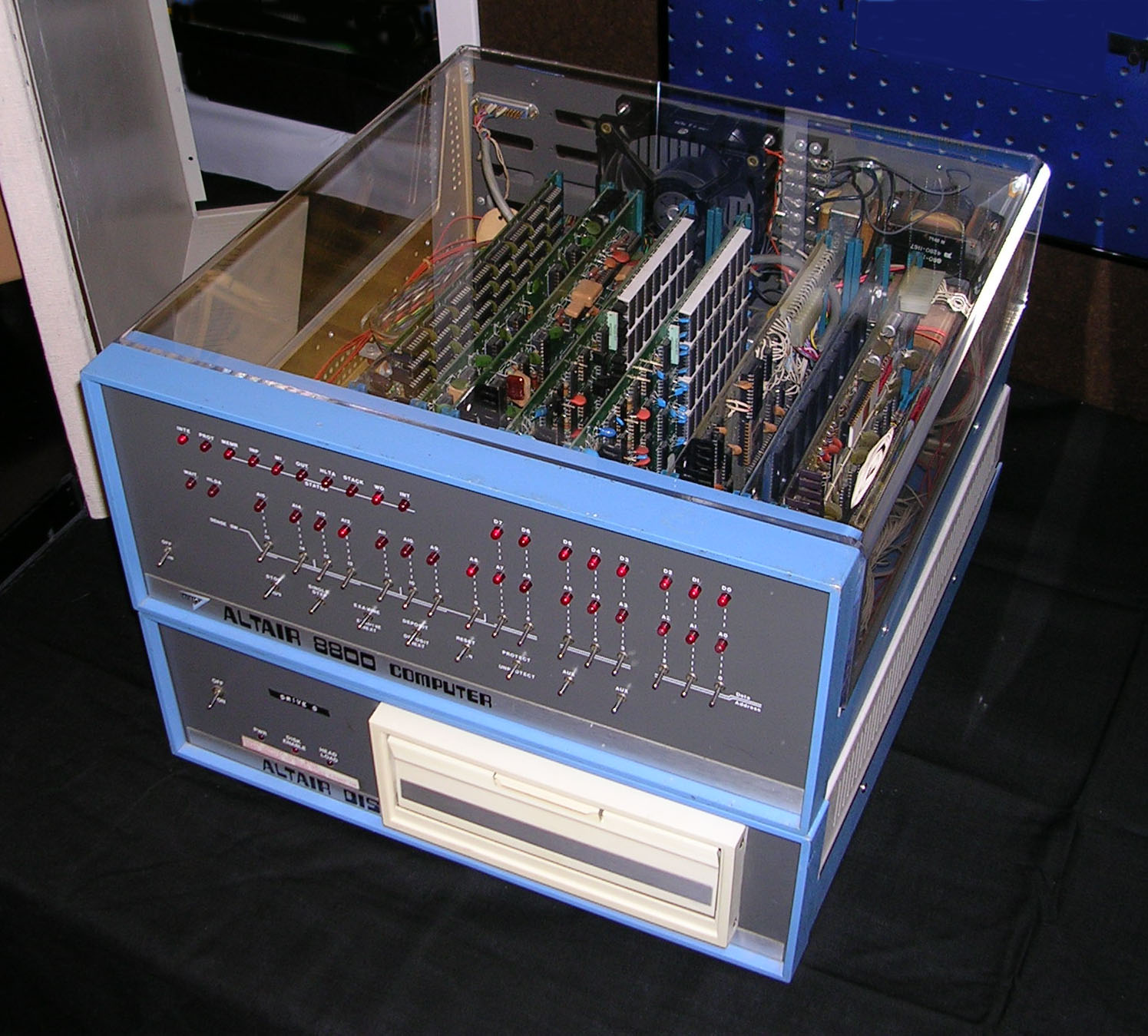
Set an Altair 8800 on the bench, take off the lid, and look inside. What you find is not what the word “computer” might lead you to expect. There is no single great board carrying the whole machine. There is, instead, a heavy steel box, a large power supply taking up most of the floor of the cabinet, and — bolted upright against the back — a short row of identical sockets, most of them empty. Plugged into one of those sockets is a small card carrying the 8080 and a few support chips. Plugged into another is a card carrying a sliver of memory. The rest of the slots wait, vacant, for boards the buyer has not yet bought. The machine you have just opened is, quite deliberately, mostly absent.
That absence is the architecture, and it is the subject of this volume. We will look at four things and how they fit together: the system design — a passive backplane of slots into which everything plugs, the single most consequential decision in the whole machine; the CPU board — the 8080 of Volume 2 given a clock and a translator and set on a card of its own; the bus — the hundred-pin backplane that started life as merely “the Altair bus” and became, against all aesthetic expectation, the industry’s first great standard, the S-100; and the front panel — the wall of toggle switches and red lamps that, in the bare machine, was the only way a human had to reach inside. We will close on what you actually got for your money: a computer with a 64-kilobyte appetite and 256 bytes to eat. Operating that machine — toggling programs in by hand — is the subject of Volume 5. Here the task is to understand how it is built.
4.2 A bus with cards: the pivotal decision
The defining architectural choice of the Altair 8800 was made, by Roberts’s own later account, partly out of necessity and partly out of foresight, and it is worth stating as plainly as possible because everything else in the series flows from it. The Altair is not a computer on a board. It is a card cage.
Roberts had set out to design the machine as a small number of large boards, the conventional approach. But the 8080 and its support, the memory, the front-panel logic, and the input/output circuitry would not fit sensibly onto one board, and a fixed set of a few big boards would have locked the machine into one configuration forever. The solution he reached is the one that mattered: build the machine out of small, removable cards, and reduce the “motherboard” to almost nothing — not a board carrying the computer’s logic at all, but a passive backplane, a piece of fibreglass whose only job is to carry a set of connectors wired in parallel and distribute power and signals between whatever cards happen to be plugged into them.
The distinction between an active and a passive backplane is the whole point. In most computers the main board is the computer: it carries the processor and the core logic, and expansion connectors hang off the side of it as a secondary convenience. In the Altair the backplane carries no logic whatsoever. It is inert — a set of sockets and the wires between them. Every functional part of the machine, the processor included, lives on a card that plugs into one of those sockets, and any card can in principle sit in any slot, because every slot is wired identically to every other. The backplane does not know or care whether the card in slot 2 is a processor, a memory board, or a serial interface. It simply connects pin 3 of every slot to pin 3 of every other slot, and so on for all hundred pins, and lets the cards sort out among themselves who is talking and who is listening.
Physically, the base Altair shipped with a four-slot backplane — a short card mounted vertically against the rear of the cabinet, with room for the CPU card and three others. That was rarely enough for long. MITS sold an expander board that brought the capacity up, and a fully populated Altair cabinet could hold on the order of sixteen to eighteen cards across the original motherboard and an expander, the slots ganged together into one continuous bus. Around that backplane sat the rest of the machine’s bulk: the substantial steel chassis, and above all the heavy linear power supply — a large transformer, big filter capacitors, and regulators — that dominated the inside of the box and supplied the unregulated voltages the cards would each regulate down for themselves. The Altair is a physically heavy object for what it computes, and most of that weight is iron and copper in the power supply, feeding a row of slots.
Why does this choice matter so much that it earns the front of the volume? Because an open card-cage bus is an invitation. A computer built as a sealed set of boards is finished when it leaves the factory; you own exactly the machine you bought. A computer built as a passive backplane with a published, regular bus is finished by whoever owns it — and, crucially, by anyone who cares to design a card for it. The empty slots are an open question put to the world: what would you like this machine to become? MITS could not have built every board an owner might want, and with 256 bytes of memory and no peripherals the bare machine obviously needed a great many boards. The open bus meant MITS did not have to build them all. Hobbyists could build their own; and, as Volume 6 will recount in detail, dozens of small companies sprang up to build them for sale — memory boards, serial and parallel interfaces, cassette and floppy controllers, video boards, music synthesizers — each one a card that plugged into the same hundred-pin slots. The card cage is the seed of the entire S-100 ecosystem. The Altair mattered as a platform, and it could be a platform only because, at its heart, it was an empty row of identical sockets waiting to be filled.
        ALTAIR 8800 — passive backplane / card cage (looking down)

   +-------------------------------------------------------------+
   |                                                             |
   |   [ HEAVY LINEAR POWER SUPPLY: transformer + caps + regs ]  |
   |        | +8V unreg   | +18V   | -18V  (to every slot)       |
   |        v             v        v                             |
   |   ==BACKPLANE=BUS=(100 lines wired in parallel)============= |
   |    || || || || || || || || || || || || || || || ||  slots   |
   |   +--++--++--++--++--++--++--++--++--++--++--++--++--++--+    |
   |   |CP||16||4K||1K||  ||  ||  ||  ||  ||  ||  ||  ||  ||  |    |
   |   |U ||K ||DY||ST||SI||  ||  ||  ||  ||  ||  ||  ||  ||  |    |
   |   |80||..||N.||AT||O .|| empty slots: the open question      |
   |   |80||..||..||IC||/P||  ||  ||  ||  ||  ||  ||  ||  ||  |    |
   |   +--++--++--++--++--++--++--++--++--++--++--++--++--++--+    |
   |    ^   ^   ^   ^   ^                                         |
   |   CPU mem mem mem  I/O  ... any card in any slot;           |
   |   card card card    card    every slot wired the same.      |
   +-------------------------------------------------------------+
     The backplane carries NO logic. It only distributes power
     and the 100 bus lines. The computer lives entirely on cards.
4.3 The CPU board
The processor of Volume 2 — the 40-pin Intel 8080, running at 2 MHz, with its clean 16-bit address bus and 8-bit data bus — does not, on its own, plug into anything. A bare 8080 cannot run. It needs a precisely shaped clock to step it through its cycles, and it needs a translator to turn its terse, time-multiplexed signalling into the steady, labelled control lines that memory and peripherals expect. In the Altair, the 8080 and exactly those two helpers live together on a single plug-in card — the CPU board — that occupies one slot of the backplane like any other card. The processor is not privileged in its physical position; it is simply the card that happens to be driving the bus.
The first helper is the clock. The 8080 famously required a two-phase, non-overlapping clock at demanding voltage levels — two separate square waves, conventionally called φ1 and φ2, carefully timed never to be high at once. Generating those by hand was fiddly, so Intel sold a companion chip to do it: the 8224 clock generator. Fed by a quartz crystal (an 18 MHz crystal divided down), the 8224 produces the two clean phases the 8080 needs, derives the 2 MHz system clock the rest of the machine runs on, and also handles the chip’s power-on reset and its READY synchronization. One small chip turns a crystal into a properly conditioned heartbeat for the processor.
The second helper is the translator, and it earns its place because of a quirk in how the 8080 communicates. At the start of every machine cycle the 8080 puts a status byte out onto its data bus — a set of flags announcing what kind of cycle this is going to be: a memory read, a memory write, an instruction fetch, an input, an output, a stack operation, an interrupt acknowledge. That information is multiplexed onto the data pins for only a moment before the pins revert to carrying actual data. To build a computer you must catch that status byte, latch it, and decode it into the plain, persistent control signals everyone else relies on — separate lines that say, unambiguously and for the whole cycle, “memory, read” or “I/O, write.” Intel’s chip for the job was the 8228 system controller and bus driver. The 8228 latches the status byte, generates the standard control strobes (memory read, memory write, I/O read, I/O write, interrupt acknowledge), and buffers the data bus so it can drive the load of a backplane full of cards. Together the trio — 8080 processor, 8224 clock generator, 8228 system controller — formed the canonical heart of an 8080 system, and on the Altair’s CPU board they sit together, taking the processor’s raw signals and presenting them, cleaned and labelled and buffered, to the hundred pins of the bus.
Everything past the edge connector of that card, then, is the bus. The CPU board’s job is precisely to be the bridge: 8080 on one side, backplane on the other. Which brings us to the backplane itself.
4.4 The hundred-pin bus: from “the Altair bus” to IEEE-696
When Roberts needed a connector for his cards, he did what a man running a nearly bankrupt company does: he bought cheap. He found a supply of inexpensive 100-pin edge connectors — military surplus, by the usual account — and designed his cards with a matching hundred-contact edge. That pragmatic, almost accidental choice fixed the width of the bus at 100 pins, and a hundred pins is a great many: far more than the 8080 strictly needed, enough to carry every signal the processor produced, several supply voltages, a generous helping of grounds, and a scattering of spares besides.
What Roberts put on those hundred pins was, in essence, the 8080’s own signals, exposed more or less directly to the outside world. This is the honest character of the bus, and it is the key to understanding both its success and its bad reputation. There was no abstraction layer, no carefully designed protocol sitting between the processor and the backplane: the bus was the 8080’s nervous system, brought out to a row of connectors. Its signal definitions, as later observers put it dryly, “closely follow those of an 8080 microprocessor system,” for the simple reason that the 8080 was the first and defining thing wired to it. The hundred pins carried, among much else:
- a 16-bit address bus (A0–A15), giving the full 64 KB reach of the 8080;
- not one 8-bit data bus but two — a separate 8-bit Data In bus and 8-bit Data Out bus, eight lines for data flowing toward the processor and eight more for data flowing away from it. Where the 8080 itself used a single bidirectional data bus, the Altair split it into two unidirectional halves on the backplane, which simplified the card-level logic at the cost of using sixteen pins to do an eight-pin job — exactly the sort of trade a hundred-pin budget invites;
- the decoded control and status lines out of the 8228 — the memory and I/O read/write strobes, the status flags, interrupt and hold and wait signalling;
- the system clock phases; and
- the power rails — the unregulated +8 V and ±18 V that each card stepped down to the regulated voltages its own chips required, along with many ground returns.
        THE 100-PIN BUS  ("Altair bus" -> S-100 -> IEEE-696)

   CPU CARD                    BACKPLANE  (100 lines)         OTHER CARDS
  +--------+   16 address   |==A0..A15====================|  +---------+
  | 8080   |--------------->|                             |->| MEMORY  |
  |  |     |    8 DATA OUT  |==DO0..DO7===================|->|  card   |
  | 8224clk|--------------->|                             |  +---------+
  |  |     |    8 DATA IN   |==DI0..DI7===================|<-+---------+
  | 8228sc |<---------------|                             |  | I/O     |
  +--------+   control/stat |==MEMR MEMW IN OUT INTA...===|->| serial  |
       |      clock phases  |==phi1 phi2 / WAIT HOLD INT==|  +---------+
       |      power rails   |==+8V unreg / +18V / -18V / GND lines====|
       +--- raw 8080 signals brought out, +/- directly, onto 100 pins.
            Open and regular -- but electrically noisy and marginal.
The result was a bus with a split personality. On one hand it was electrically messy — and this is not retrospective snobbery; it was a live complaint at the time. With the processor’s raw signals run out across a long backplane, with unregulated power distributed to be regulated locally, with two separate data buses and a hundred closely spaced lines and no great care taken over termination or noise, the early Altair bus had a genuine reputation for noise, ringing, and marginal signals. Cards from different makers did not always agree on exactly how an under-specified line should behave; a machine stuffed full of boards could be temperamental in ways that were maddening to debug. Later refinements — extra ground pins, better-defined timing, the discipline of a written standard — tamed much of this, but the original bus was, by common consent, a quirky and demanding thing to build reliable hardware around.
On the other hand — and this is what actually mattered — it was open, regular, and ubiquitous. Every slot was wired the same; the signals, however messy, were knowable; and crucially the bus belonged to no one. Roberts had not patented it or locked it down. Anyone could build a card for it. That openness was worth far more than elegance, and the market proved it. As other companies built Altair-compatible machines and boards, the bus needed a name that did not belong to MITS, and in 1976 two engineers at the board-maker Cromemco, Harry Garland and Roger Melen, coined one: S-100, for “Standard 100 pins.” Under that name the Altair’s accidental, surplus-connector bus became the first widely adopted microcomputer expansion standard — for several years nearly synonymous with serious hobby and small-business computing. And at the end of that road the once-quirky bus received the ultimate certificate of respectability: a formal standardization by the Institute of Electrical and Electronics Engineers as IEEE-696, approved by the IEEE Computer Society on 10 June 1982 (and by ANSI the following year), which tidied up the timing, defined the lines properly, and extended the address bus to 24 bits. A bus born of a cheap box of military-surplus connectors, infamous for its noise, ended its life as a published international standard. That arc — from “the Altair bus” to S-100 to IEEE-696 — is the whole story of why openness beat elegance.
4.5 The front panel
The bus reaches inward to the cards; the front panel reaches outward to the human. On the bare Altair it was the only way a person could put anything into the machine or read anything out of it — no keyboard, no screen, nothing but switches and lamps — and so the panel is not a peripheral but a fundamental part of the architecture: the machine’s entire user interface, wired straight to the bus. (Actually operating it, toggling a program in bit by bit, is the craft taught in Volume 5; here we are concerned with what the panel is.)
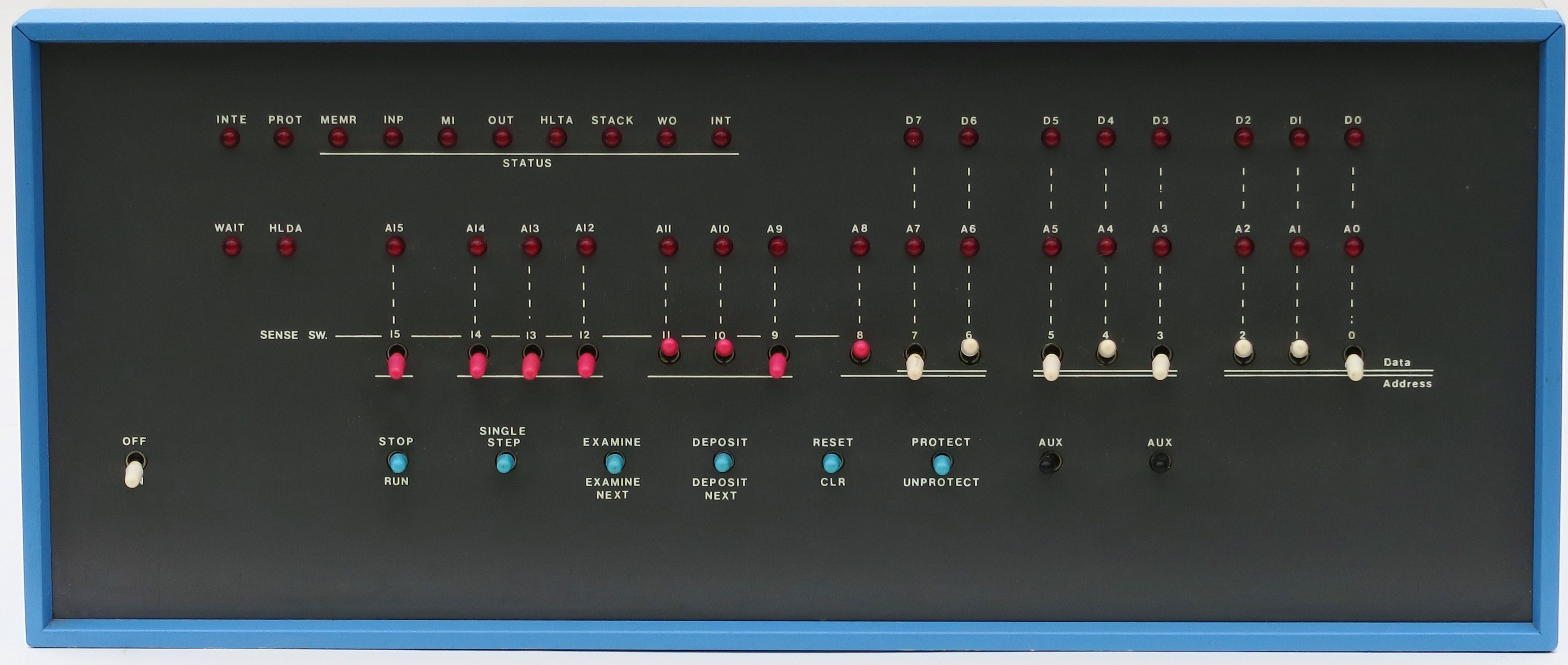
The layout, said to be inspired by the front panel of Data General’s Nova minicomputer, divides cleanly into two regions: a wall of red LEDs on top, reporting the machine’s state, and a row of toggle switches below, for commanding it.
The lamps are organized to mirror the bus. A long row of sixteen LEDs across the top shows the address bus, A15 down to A0 — exactly what address the processor is currently presenting. Below them, eight LEDs show the data bus (in Altair terms, the data appearing on the bus, D7 down to D0). And off to the left sits a cluster of status and control lamps decoding the 8228’s status byte and the processor’s condition: lights labelled with the cycle types and machine states — INTE (interrupts enabled), PROT (memory protected), MEMR (memory read), INP (input), M1 (instruction fetch), OUT (output), HLTA (halt acknowledge), STACK, WO (write/output), INT (interrupt), and beside them WAIT and HLDA (hold acknowledge). The lamps are grouped visually in threes — a nod to reading the binary as octal, the base in which Altair programmers naturally thought, since three bits make one octal digit. To read the machine is simply to read those rows of red lights.
The switches command it. The lower row carries sixteen address/data toggle switches, A15 down to A0, each set up or down for a one or a zero. These do double duty: a full sixteen of them to compose a 16-bit address, but only the rightmost eight (A7–A0) used as the data or switch register when a byte of data is to be entered — the lower eight switches are the data register. To the left of those sit the control switches, each a spring-loaded toggle whose up and down throws invoke two related functions:
- STOP / RUN — halt the processor, or set it running;
- SINGLE STEP — advance the machine exactly one machine cycle, for watching a program crawl forward one beat at a time;
- EXAMINE / EXAMINE NEXT — display the contents of the memory address set in the switches, or step to and display the next address;
- DEPOSIT / DEPOSIT NEXT — write the switch-register byte into the current address, or advance to the next address and write there;
- RESET / CLR — reset the processor (forcing the program counter to address 0) and clear;
- PROTECT / UNPROTECT — mark a block of memory read-only, or release it, guarding a loaded program against accidental overwrite;
- plus the power switch and one or two spare AUX toggles.
With nothing but these — sixteen address/data switches, a handful of control toggles, and three rows of red lamps — a person could set an address, examine what was there, deposit a new byte, step to the next, and run the result. That spare vocabulary was, for the bare machine, the entirety of human-computer interaction.
        ALTAIR 8800 FRONT PANEL  (schematic, not to scale)

  STATUS LEDs                         ADDRESS  (A15 ............ A0)
  o o o  o o o  o o o  o          o o o  o o o  o o o  o o o  o o o  o
  INTE PROT MEMR INP M1 OUT       o o o  o o o  o o o  o o o  o o o  o
  HLTA STACK WO INT  WAIT HLDA     DATA  (D7 ........ D0)
                                  o o o  o o o  o o

  ON   STOP  STEP  EXAM  DEP  RESET  PROT  AUX |  A15 .......... A0
  []   /\    /\    /\    /\    /\     /\    /\  |  | | | | | | | | | |
  OFF  RUN   --   EXNXT DPNXT  CLR  UNPROT  --  |  ^^ 16 ADDRESS / lower 8 = DATA
       <----- control switches ----->          |  <----- address/data switches ---->
4.6 Memory, and the bare configuration
We come, finally, to the most quietly astonishing fact about the architecture: how little of it, in the base machine, was actually there. The 8080 inside the Altair could address 65,536 bytes — a full 64 KB, an address space that in 1975 was downright generous. The base Altair 8800, as it shipped, came with 256 bytes of read/write memory. Not 256 kilobytes; 256 bytes. A quarter of one kilobyte, into an address space of sixty-four. The machine arrived with its enormous appetite and almost nothing to feed it — addressing room for 64 KB, populated to roughly 0.4 percent of capacity.
And that was the design, not an oversight. Memory, like everything else, was a card you plugged into the bus, and the base machine came with the most minimal card MITS could justify: a “1 K” memory board populated with only 256 bytes of static RAM. The remaining sixty-three-and-three-quarter kilobytes of address space were a void to be filled, slot by slot, board by board, as the owner’s budget allowed — which is precisely why the open bus mattered so desperately. A bare Altair was not a finished computer so much as a socket for one.
The early memory boards became their own small chapter of Altair lore. The first MITS memory card was a 1 K static RAM board — static memory, built from flip-flops, simple and reliable but expensive per bit. To pack more memory in more cheaply, MITS turned to dynamic RAM, which stores each bit as a charge on a tiny capacitor and so needs far fewer transistors per bit — but which must be constantly refreshed, every cell rewritten thousands of times a second before its charge leaks away. MITS’s 4 K dynamic RAM board, the natural way to get a useful amount of memory into the machine, became notorious: the early boards were buggy and marginal, their refresh and timing finicky, their reliability poor enough to pass into legend. Their troubles were real enough that third parties saw an opening — most famously Processor Technology, which built a solid 4 K static board specifically to be the dependable memory the MITS dynamic board was not, and built a company on the back of it. The wobbliness of the 4 K dynamic board is one of those small hardware failures that shaped history: it helped seed the very ecosystem of competitors the open bus made possible.
One more absence completes the picture, and it sets up the volumes to come. The base Altair had no ROM — no read-only memory holding a monitor, a bootstrap, or any built-in software at all. There was nothing in the machine when you switched it on; its memory came up filled with random nonsense, and it had no idea how to load anything. This is why the front panel was not a luxury but a necessity: with no ROM to bootstrap from, the only way to get the very first instructions into a fresh Altair was to toggle them in by hand, one byte at a time, on those sixteen switches — the painstaking ritual that is the whole subject of Volume 5. And it is why the hunger of the bare machine — for memory, for a way to load programs, for a real language to run — summoned the S-100 board ecosystem of Volume 6 and the Altair BASIC of Volume 7. The architecture, in the end, is an architecture of deliberate incompleteness: a capable processor, a vast empty address space, an open bus inviting boards, and a wall of switches to reach inside — a machine designed, more than anything, to be finished by the people who bought it.
Sources
- Wikipedia, “Altair 8800.” Confirms the passive-backplane design (Roberts reducing the motherboard to a backplane interconnect between removable cards); the four-slot motherboard and expansion; the Intel 8080 at 2 MHz; the 64 KB address space; the front panel (toggle switches and LEDs, inspiration from the Data General Nova, programming by toggling opcodes in binary); the base machine’s 256 bytes of RAM on a “1024-word” board; and the troublesome 4 K dynamic RAM board versus third-party (Processor Technology) 4 K static boards. https://en.wikipedia.org/wiki/Altair_8800
- Wikipedia, “S-100 bus.” Confirms the 100-pin edge connectors wired in parallel; Roberts’s 1974 design for the Altair using surplus 100-pin connectors; the two unidirectional 8-bit data buses and 16-bit address bus (later extended to 24 bits); that the bus signal definitions closely follow an 8080 system; the “S-100” name coined by Cromemco’s Harry Garland and Roger Melen in 1976; and the IEEE-696 standardization approved by the IEEE Computer Society on 10 June 1982 (ANSI 1983). https://en.wikipedia.org/wiki/S-100_bus
- Wikipedia, “Intel 8224” and “Intel 8228.” Confirm the 8224 clock generator (crystal-driven two-phase clock, system clock, reset and READY synchronization for the 8080) and the 8228 system controller / bus driver (latching and decoding the 8080 status byte into memory and I/O read/write control strobes, and buffering the data bus). https://en.wikipedia.org/wiki/Intel_8224 · https://en.wikipedia.org/wiki/Intel_8228
- Altair 8800 Operator’s Manual (MITS), Part 3, “Operation of the Altair 8800,” via the Ubuntourist / RetroComputerInstructionManual transcriptions. Confirms the functions of the control switches — STOP/RUN, SINGLE STEP, EXAMINE / EXAMINE NEXT, DEPOSIT / DEPOSIT NEXT, RESET, PROTECT/UNPROTECT — and that the sixteen address/data switches set an address while the lower eight serve as the data/switch register, with the LED rows showing address, data, and status. https://ubuntourist.codeberg.page/Altair-8800/part-3.html · https://grantmestrength.github.io/RetroComputerInstructionManual/altair_front_panel.html
- deramp.com, “Altair 8800c Front Panel Board Set” manual, and the AltairComputerClub archives. Corroborate the front-panel LED groups (status, WAIT/HLDA, eight data, sixteen address), the status-light labels (INTE, PROT, MEMR, INP, M1, OUT, HLTA, STACK, WO, INT), and the differences between the original 8800 and 8800b CPU/front-panel boards. https://deramp.com/downloads/altair/hardware/altair_8800c/Front%20Panel%20Manual.pdf
- Figures: “MITS Altair 8800 Front Panel” by Cromemco (CC BY-SA 4.0) and “Altair 8800 Computer” by Michael Holley / Swtpc6800 (public domain), both via Wikimedia Commons. https://commons.wikimedia.org/wiki/File:MITS_Altair_8800_Front_Panel.jpg · https://commons.wikimedia.org/wiki/File:Altair_8800_Computer.jpg


Comments (0)