Altair 8800 · Volume 13
Altair 8800 — Volume 13 — The Modern Revival: Altair-Duino and Kindred Replicas
How an Arduino Due hidden behind a faithful reproduction of MITS's switch-and-lamp front panel puts the whole 1975 experience back on the bench — not as a museum relic behind glass, but as a kit you solder together yourself.
13.1 About This Volume
The last volume left the Altair 8800 in three kinds of safekeeping — the surviving iron in collectors’ hands and museum cases, the software emulators that run its code perfectly on any modern machine, and the scanned manuals and archived listings that preserve the documentary record. It noted, too, that all three together had begun to grow something new. This volume is about that new thing. It is the first volume in the series written wholly in the present tense and pointed forward: not how the Altair was built and used in 1975, but how, in 2026, an ordinary enthusiast with a bench and a soldering iron can build one of their own and have its red lamps glowing on the desk by the weekend’s end. The bridge between those two worlds is a small, beloved object called the Altair-Duino, and the work of this volume is to explain exactly what it is, why it succeeds, where it sits in a wider family of Altair recreations — and why it is the natural last step before Jeff picks up the iron himself in Volume 14.
This is a maker’s volume, and it leans directly on the one before it. The Altair-Duino is not a from-scratch reinvention of the Altair; it is a physical front panel wrapped around an 8080 emulator of exactly the kind Volume 12 described. So everything that volume said about emulation — that it can boot the real Altair BASIC, run real CP/M, model the 8080 instruction set and the machine’s I/O faithfully — is the running engine underneath everything described here. What the replica adds is the one thing an emulator in a browser tab or a terminal window can never supply: the object. The wall of toggle switches and red lamps that Volumes 4 and 5 called the soul of the machine — the only door into a bare Altair, the display and the keyboard and the debugger all at once. This volume is the story of how that soul was given a body again, cheaply, and put within reach of anyone who wants one.
13.2 The replica impulse
Begin with a question that sounds naive and is not: if a free emulator already runs the real software, perfectly, on any laptop — why would anyone build a physical Altair at all? The emulator loads Altair BASIC, boots CP/M, plays Kill the Bit, single-steps the 8080, and never needs a tantalum capacitor replaced or a forty-five-year-old switch contact cleaned. By every functional measure the problem of “experiencing an Altair” is solved, and solved for nothing. And yet a steady stream of people spend evenings and real money soldering hundreds of components onto a circuit board to own a panel that does, electrically, nothing the emulator was not already doing on screen. The reason is the gap between behaviour and object, and it is the gap this whole revival lives in.
An Altair 8800 is not, experientially, its instruction set. It is a thing — a blue-and-grey steel box, the specific dull-red glow of LEDs ranged in rows behind a silkscreened legend, the firm mechanical throw of a paddle switch flicked up to set a bit and pressed down to deposit a byte into memory. Volume 5 argued that the machine’s deepest lesson was tactile: a computer you learned by touching, by spelling a program into the switches one byte at a time and reading the answer off the lights. An emulator window reproduces the logic of that experience and discards its entire physical form. You can click a picture of a switch with a mouse; you cannot throw it. You can watch a simulated lamp change colour in a rectangle of pixels; you cannot stand a real one on your bench, glance at it across the room, or hand the toggles to a visitor and watch them light up. The replica impulse is the desire to get the form back — to have the blinkenlights, the real switches under the fingers, the actual front panel that made the Altair the Altair.
It helps to lay the options out as a spectrum, because the Altair-Duino occupies a very specific and clever point on it. At one end is pure software emulation: the emulators of Volume 12, complete in behaviour, empty of body. At the far other end is full hardware re-creation: building an actual 8080-based computer out of real period logic — genuine Intel 8080 chips on genuine S-100 boards — so that the machine is truly an Altair and not a simulation at all. Between those poles sits the approach this revival made popular: a physical panel driven by emulation. The front panel is real — real toggle switches, real LEDs, real wiring on a real PCB — but the processor behind it is an 8080 emulator running on a cheap modern microcontroller. You get the authentic interface married to an emulated core, at a fraction of the cost and difficulty of either extreme. What made that middle path suddenly practical was the maturing maker ecosystem of the 2010s: cheap, powerful microcontroller boards with rows of general-purpose I/O pins; affordable small-run printed circuit boards; online kit fulfilment; and communities that share open hardware files freely. A faithful Altair panel had been buildable in principle for decades. What changed is that it became affordable, reproducible, and shareable.
13.3 The Altair-Duino: an authentic panel over an emulated core
The machine that crystallised all of this is the Altair-Duino, designed by Chris Davis — a Western Minnesota software developer — and sold through his shop Adwater & Stir (Famous Davis LLC). It is exactly the hybrid the spectrum predicts: a faithful reproduction of the Altair 8800’s iconic front panel, with its full bank of toggle switches and its rows of red LEDs, mounted over an Arduino Due that runs an 8080 emulator underneath. The Due is the computer; the panel is its face. The genius of the thing is in how completely the face and the computer are joined.
The brain is worth a moment, because the contrast is delicious. The original Altair ran an Intel 8080 at 2 MHz — a genuine microprocessor that, in 1975, was the beating heart of the personal-computer revolution. The Arduino Due is a small hobbyist board built around an Atmel SAM3X8E: a 32-bit ARM Cortex-M3 clocked at 84 MHz, with far more memory and speed than the entire original machine, costing a few tens of dollars off the shelf. There is enough headroom in that little ARM chip to emulate the whole 8080 — every register, flag, and timing quirk — fast enough that the emulation runs at, or beyond, original Altair speed, while the chip simultaneously scans the panel’s switches and drives its lamps. A microcontroller that costs less than a paperback now does, in software and with cycles to spare, what a rack of TTL logic and a hundred-pin bus once did in hardware.
The emulator it runs is not Davis’s own; it is the Arduino Altair 8800 simulator written by David Hansel (dhansel/Altair8800 on GitHub), an open-source project Hansel published on Hackster.io in early 2017. Hansel’s simulator is the codebase that makes the Altair-Duino an Altair. It is a cycle-approximate recreation of the original machine: the Intel 8080 CPU is emulated, along with the basic I/O — disk drives, serial ports, the sense switches — while everything that runs on top is the genuine article, the real Altair machine code and real CP/M written more than forty years ago and unchanged. Crucially, Hansel’s simulator does not merely run programs; it models the front panel itself, tracking the address bus, the data bus, and the status flags exactly as the real machine drove its lamps. That is the feature Davis’s kit exists to expose. Where Hansel’s software running on a bare Arduino lights a handful of indicator LEDs on a breadboard, the Altair-Duino gives that same software a full reproduction panel to drive, so the emulated 8080’s register activity dances across the lights in the same places, in the same patterns, as it would have on a 1975 machine. Davis is generous about the debt, crediting Hansel’s work directly and pointing builders to Hansel’s own write-up as the definitive account of the simulation. It is a clean division of labour: Hansel built the engine; Davis built the body and turned it into a product anyone can buy and build.
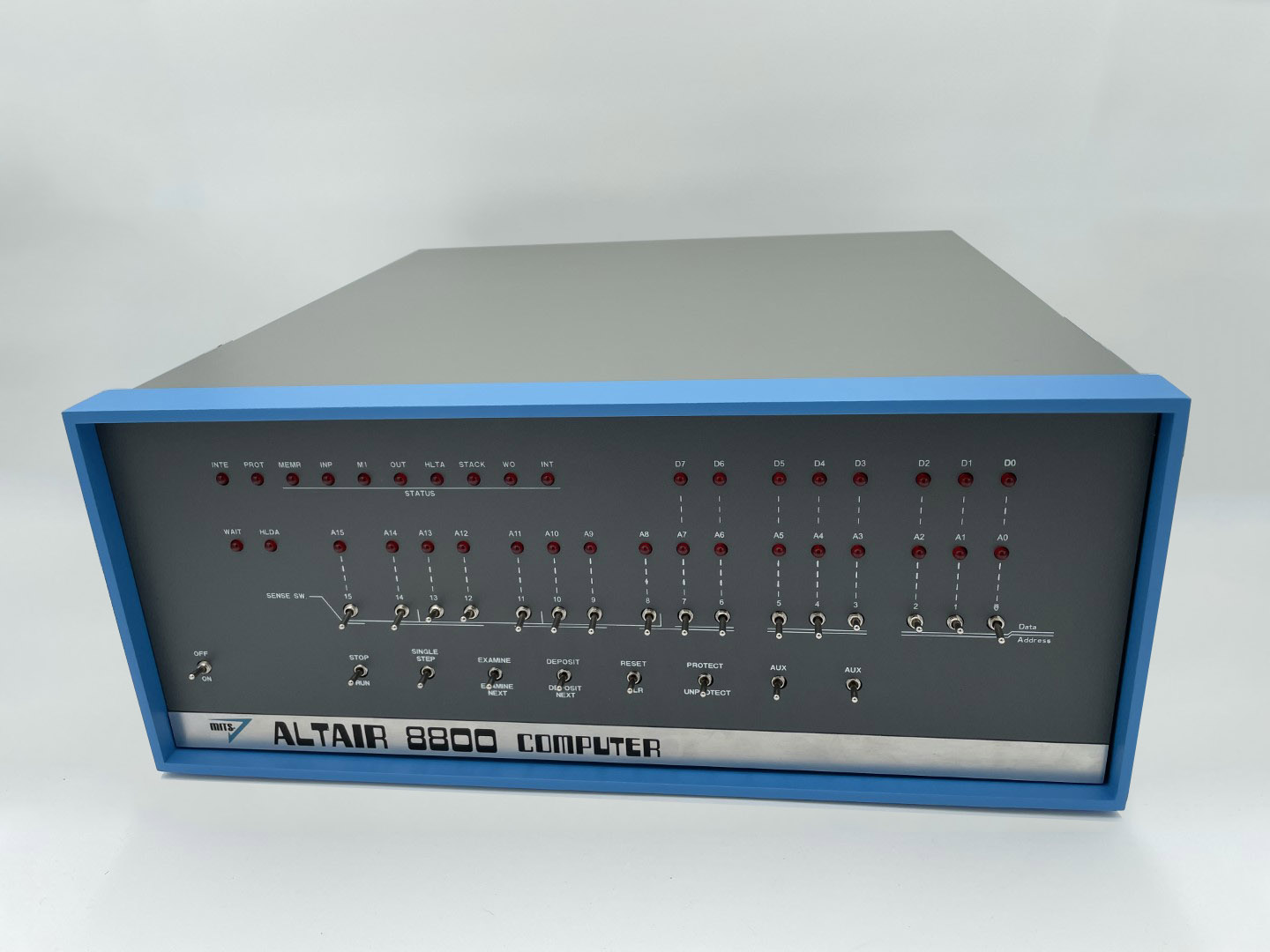
13.4 What it gets right
The Altair-Duino is not merely a replica; it is the one that broke through to a wide audience, written up everywhere from Hackster and Hackaday to TechCrunch (which in 2018 called it “the modern Altair replica of your dreams”). That reach is not an accident, and it is instructive to name the specific design choices that earned it, because each is a small lesson in how to make a faithful thing people actually want.
First, panel fidelity. The Altair-Duino’s front panel is not a stylised homage; it is a careful reproduction of the actual 8800 layout, with the legend text, the lamp groupings, and the switch arrangement matched to the original — the STATUS row, the address and data LEDs, the SENSE switches that Volume 5’s Kill the Bit reads, and the control toggles (EXAMINE, DEPOSIT, SINGLE STEP, RESET, PROTECT, STOP/RUN) all in their right places. Someone who learned the real machine recognises it instantly; someone who never saw one is looking at a true likeness. The top-of-the-line Pro version goes further still, dressing the panel in a full-size reproduction of the Altair’s blue-and-grey case so that the finished object is a dead ringer for the 1975 machine on a shelf.
Second, real tactile switches — not buttons painted to look like toggles, but genuine paddle switches you throw with a finger, restoring the single most important physical fact of front-panel computing: that you program the bare machine by hand, one bit at a time, and feel it. Everything Volume 5 taught about the toggle-in ritual — set the address switches, EXAMINE, set the lower eight data switches, DEPOSIT, DEPOSIT NEXT down the program — works on the Altair-Duino exactly as it worked in 1975, because Hansel’s emulator honours the same controls.
Third, software completeness. Because the core is a faithful 8080 emulator with emulated disk drives, you do not get a toy that blinks decoratively; you get a whole working Altair. The kit ships with a microSD card of period software: Altair BASIC — including the legendary 4K BASIC, the first product Microsoft ever sold, small enough to live in four kilobytes — along with Altair DOS, Microsoft’s later BASICs, and a stack of CP/M programs (WordStar, SuperCalc and the like), plus the games. Kill the Bit, the 24-byte front-panel game of Volume 5, runs on it the way it was meant to be played: a lit bit marching around the real address LEDs, killed by slapping the real sense switches. An entire software world, not a demo loop.
Fourth, price and accessibility. A genuine 1975 Altair, if you can find one, is a rare, heavy, fragile, expensive artifact. The Altair-Duino, by contrast, sells as an affordable kit — and crucially, as a kit you choose how to engage with. Davis offers a tiered range: a bare-bones Experimenter for people who want the emulator and the bus without the full enclosure; the standard edition with a low-profile acrylic frame; and the Pro, with the full reproduction case, VT100 terminal emulation over VGA, SD storage, and audio. Each is sold either as a kit to solder yourself or, for those who would rather skip the iron, assembled and tested. The same object meets the hobbyist who wants the building as much as the running, and the collector who just wants the finished machine.
Fifth, and not least, fidelity to the spirit of expansion. The original Altair’s whole architecture (Volume 4) was a passive bus you plugged cards into, and the Altair-Duino honours that too: it supports an I/O expansion bus — David Hansel’s design — that lets builders add up to six expansion cards, echoing the S-100 slots of the real machine. The replica is not a sealed novelty; like its ancestor, it is a platform to tinker on.
13.5 The wider replica family
The Altair-Duino did not appear in a vacuum, and placing it among its kin is the best way to see what kind of thing it is — defined usefully by where each lands on the emulation-to-hardware spectrum from earlier in this volume.
Toward the full-hardware end is the most authentic recreation of all: Grant Stockly’s reproduction kits (altairkit.com), the original of the modern reproduction efforts, sold from the mid-2000s. Stockly painstakingly recreated every board of an original Altair — CPU board, S-100 motherboard, display/control board, memory — from the original schematics, and pointedly did not substitute modern equivalents for the period chips: his kits use a genuine Intel 8080, with changes made only for quality and safety. The result is not an emulation at all but a true Altair in vintage silicon, complete with a genuine Optima enclosure and silkscreened panel — and priced accordingly, on the order of well over a thousand dollars. This is the gold standard of authenticity, and the costliest and most demanding path.
A step toward the middle is Mike Douglas’s Altair 8800 Clone (altairclone.com), a full-size, standalone reproduction begun in 2012 when Douglas discovered what a real Altair — or even a reproduction kit — cost. From the operator’s seat the Clone duplicates the look, feel, features, performance, and even the limitations of an original: software runs the same way, at the same speed. But internally it takes the emulation route, using modern hardware (a Parallax Propeller microcontroller) to emulate the 8080 and its supporting logic, rather than vintage components. It is, in a sense, the Altair-Duino’s larger, self-contained cousin — an authentic panel and case over an emulated core, but built as a complete dedicated machine rather than around a hobbyist Arduino board. (The Altair Clone project also does the community a quieter service: altairclone.com is one of the archives that preserves the canonical Kill the Bit listing credited in Volume 5.) Adwater & Stir even sells a standalone reproduction case for builders who want that authentic enclosure around their own panel.
At the small and playful end of the family are the miniatures and oddities: briefcase and desktop mini-replicas, and pocket-sized tributes such as Lee Hart’s Altaid 8800, which crams an 8080-family front-panel computer into an Altoids tin — the Altair experience shrunk to a novelty you can carry. And at the bleeding edge of the hardware end sit the FPGA and discrete-logic recreations: designs that configure a field-programmable gate array to be an 8080 down to the gate, or that rebuild the processor and bus from individual logic chips — true gate-level re-creations rather than software pretending to be hardware, the province of serious hardware hackers.
Seen against that field, the Altair-Duino’s particular achievement comes into focus. Stockly’s kits are more authentic in their cores — they really are Altairs — but they are far harder, costlier, and rarer. Pure emulation (Volume 12) is the easiest and freest but bodiless. Mike Douglas’s Clone is gorgeous and complete but a bigger, pricier commitment. The Altair-Duino deliberately splits every difference: an authentic, satisfying panel; a faithful, complete software world; an approachable, affordable kit built on an off-the-shelf Arduino. It is faithful enough to satisfy, and easy and cheap enough to spread — which is precisely why, for someone who wants to own and build an Altair front panel without remortgaging or sourcing forty-year-old chips, it is the obvious choice.
13.6 The hand-off: a kit, a soldering iron, and Volume 14
Which brings the series, at last, to the workbench. For all the architecture and history in the twelve volumes before it, the Altair-Duino resolves into a very concrete proposition: it is sold as a kit you build yourself. What arrives is a bare printed circuit board and bags of components — the rows of LEDs, the bank of toggle switches, the headers and small parts — together with the panel overlay, the case, and a pre-programmed Arduino Due already carrying David Hansel’s emulator. Building it is an evening or two of methodical soldering: seating and soldering each LED in its place, mounting the switches square and true, fitting the headers that mate the panel board to the Due, then assembling the case and dropping in the microSD card of software. The barrier to owning an Altair 8800’s front panel is no longer money, rarity, or the hunt for vintage silicon; it is a few quiet hours and a willingness to learn to lay down a clean solder joint.
That is the most accessible way, in 2026, to own the thing this entire series has been describing — not a photograph of an Altair, not a simulation of one in a browser tab, but its actual panel, its real switches and lights, glowing on your own bench, running the real Altair BASIC and CP/M under your fingers. Everything the series built toward converges here, in a kit on a workbench: the 8080 and the passive bus of Volume 4; the toggle-in ritual and Kill the Bit of Volume 5; the I/O boards and Teletype of Volume 6; the Altair BASIC of Volumes 7 and 8; the emulation and preservation of Volume 12; the democratised, hands-on computing ethos of Volume 11. The wheel comes full circle: the machine that took the computer out of the corporate glass house and put it on a hobbyist’s bench is now, itself, a thing you build on a bench.
And that is where this volume hands off. The story can no longer be told from the outside, because the next chapter is Jeff’s own. Volume 14 documents Jeff actually building his Altair-Duino — opening the kit, taking up the iron, soldering the LEDs and switches to the panel board, mating it to the Arduino Due, assembling the case, loading the software, and bringing the panel to life for the first time: setting an address in the switches, throwing EXAMINE, and watching the red lamps answer back exactly as they did in 1975. After thirteen volumes of history and architecture, the soldering iron finally comes out. Turn the page and watch the lights come up.
Sources
- Adwater & Stir (Chris Davis / Famous Davis LLC), “The Altair 8800 Reborn” and the Altair-Duino product pages — the Altair-Duino as an Arduino-Due-based recreation of the Altair 8800 running David Hansel’s 8080 simulation behind a faithful reproduction front panel of toggle switches and LEDs; the tiered range (Experimenter, standard, Pro) sold as solder-it-yourself kits or assembled-and-tested; the Pro’s full reproduction case, VT100/VGA, SD card, and audio; and the bundled software (Altair BASIC including 4K BASIC, Altair DOS, Microsoft BASIC, CP/M programs such as WordStar and SuperCalc). Davis credits David Hansel’s simulation and bus design directly. https://adwaterandstir.com/altair/ · https://adwaterandstir.com/product/altair-8800-emulator-kit/ · https://adwaterandstir.com/author/chrisldavis/
- David Hansel, “Arduino Altair 8800 Simulator,” Hackster.io (published January 2017) and source repository
dhansel/Altair8800on GitHub — the open-source 8080 emulator the Altair-Duino runs: a cycle-approximate recreation emulating the Intel 8080 CPU and basic I/O (disk drives, serial ports, sense switches) while running genuine period Altair machine code and CP/M; models the front-panel address/data/status indicators; targets the Arduino Due (and Mega), with an external IOBus for up to six expansion cards and a Teensy 3.6 port by Dirk Herrendoerfer. https://www.hackster.io/david-hansel/arduino-altair-8800-simulator-3594a6 · https://github.com/dhansel/Altair8800 - Joe Koutoupis (koutoupis.com / Random [Tech] Stuff), “Going Retro with an Altair 8800 Emulator: Introducing the Altair-Duino,” 12 Aug 2019 — interview-based profile confirming Chris Davis as designer (a Western Minnesota software developer), the Arduino Due basis, David Hansel as author of the simulation software, the standard vs. Pro editions, and the bundled disk images (Altair DOS, Altair/Microsoft BASIC, CP/M with WordStar and SuperCalc). https://koutoupis.com/2019/08/12/going-retro-with-an-altair-8800-emulator-introducing-the-altair-duino/
- TechCrunch, “The Altairduino is the modern Altair replica of your dreams,” 26 Feb 2018 — independent write-up confirming the Arduino Due core, the toggle-switch-and-LED reproduction front panel, the microSD card of period software (Microsoft BASIC, Altair DOS, CP/M and games), the use of Mike Douglas’s Altair Clone reproduction case, and the kit’s cycle-accurate framing. https://techcrunch.com/2018/02/26/the-altairduino-is-the-modern-altair-replica-of-your-dreams/
- Altair 8800 Clone (Mike Douglas), altairclone.com, “The Details” — the full-size standalone reproduction begun in 2012, duplicating the original’s look, feel, performance and limitations while internally emulating the 8080 and supporting hardware with modern parts (a Parallax Propeller-based design) rather than vintage components; altairclone.com also preserves the canonical Kill the Bit listing cited in Volume 5. https://altairclone.com/ · https://altairclone.com/details.html
- Grant Stockly, altairkit.com (and Retro Thing, “Altair 8800 reproduction joins a growing trend,” 2006) — the genuine-hardware reproduction kit recreating every Altair board from the original schematics using a real Intel 8080 and period-correct components (changes only for quality and safety), in a genuine Optima enclosure with silkscreened panel; the full-hardware, highest-fidelity, highest-cost end of the recreation spectrum (kits priced well over a thousand dollars). http://altairkit.com/ · https://www.retrothing.com/2006/12/altair_8800_rep.html
- Lee Hart, “Altaid 8800” (sunrise-ev.com) — an 8080 front-panel computer built into an Altoids tin, representing the miniature/novelty end of the Altair-replica family. https://www.sunrise-ev.com/8080.htm
- This series — Volume 12 (surviving machines, emulators and preservation — the engine and the soil this revival grows from), Volume 11 (the democratising, hands-on ethos the replicas restore), Volume 8 / Volume 7 (Altair BASIC, including 4K BASIC), Volume 6 (the I/O boards and bus), Volume 5 (the toggle-in ritual, the front panel, and Dean McDaniel’s Kill the Bit), and Volume 4 (the 8080, the passive S-100-style bus, and the front-panel hardware). Volume 14, to which this volume hands off, documents Jeff’s own Altair-Duino build.
- Figure: Altair-Duino Pro front panel, photograph courtesy of Adwater & Stir, from the Altair-Duino 8800 Pro Emulator Kit product page. https://adwaterandstir.com/product/altair-8800-emulator-kit/
Comments (0)