Altair 8800 · Volume 11
Altair 8800 — Volume 11 — Using the Machine: Software & Daily Operation
Once the Altair had a terminal, a tape, and a language, a real working session emerged — power up, toggle the bootstrap, wait out the tape, and finally talk to the machine; this is what that day-to-day life actually felt like.
11.1 About This Volume
The earlier volumes built the machine and the language. Volumes 4 through 6 opened the cabinet, traced the S-100 bus, and added the I/O boards, the Teletype, and the path toward floppy disks; Volume 7 told the story of how Altair BASIC came to exist — Bill Gates and Paul Allen’s interpreter, written for a machine its authors had never touched. Those volumes are about the Altair as an object and BASIC as an achievement. This volume is about neither. It is about the user — the person sitting in front of the assembled machine on an ordinary evening, with a terminal humming and a cassette recorder on the desk, who simply wanted to get something done.
That is a different subject from Volume 5’s bare-machine toggling, and a deliberately complementary one. Volume 5 described the Altair with no software at all: sixteen switches, a wall of lamps, and a program spelled into memory one octal byte at a time. This volume picks the machine up at the next stage of its life — once it had grown a keyboard, a screen or a printing terminal, a way to store programs, and a body of real software to run. The front panel never disappears; every session still begins there, with a short bootstrap toggled in by hand. But once that bootstrap pulls BASIC in off the tape, the character of the work changes entirely. You stop thinking in bits and start thinking in PRINT statements. The Altair becomes, for the first time, a computer you converse with rather than one you program with your fingertips.
We will walk through that daily world in order: BASIC as the everyday environment most owners actually lived in; the arrival of CP/M — Gary Kildall’s disk operating system — and what an operating system added to an S-100 machine once floppy drives existed; the early games, utilities, and the editor-and-assembler workflow by which people wrote 8080 assembly language; the slow ritual of loading software from cassette and paper tape, and the comparative luxury of booting from a floppy; and finally a concrete, minute-by-minute account of what a real session at the machine looked and felt like. The goal throughout is to keep things grounded and practical — to convey not just what the software was, but what it was like to use it.
11.2 The everyday environment: living in BASIC
For the great majority of Altair owners through 1975 and 1976, the answer to “what software do you run?” was singular: Altair BASIC. Volume 7 covered its creation and its internals; what matters here is its role in daily life. BASIC was not merely a language you could optionally load. For most people it was the operating environment — the thing that came up after the bootstrap and stayed up for the whole session. There was no separate operating system underneath it on a cassette-and-Teletype machine; BASIC was the shell, the editor, the runtime, and the calculator all at once.
Living in BASIC meant living at the command prompt of an interpreter. You typed a line with a number in front of it and that line became part of your stored program; you typed a line without a number and it ran immediately. You listed your work with LIST, ran it with RUN, wiped the slate with NEW. The machine answered the moment you pressed return, and that immediacy — after the bit-by-bit silence of the bare panel — was the whole appeal. A schoolteacher or a hobbyist who would never in their life have toggled in machine code could write a loan-payment calculator or a dice game in BASIC in an afternoon. The arithmetic was real, the loops worked, the strings (in the larger versions) printed words. Within the limits of a few thousand bytes of program space, the Altair had become a machine that ordinary people could direct in something close to plain language.
The flavor of that environment depended heavily on how much memory you had and which BASIC you had paid for. The 4K version fit a minimal machine but offered only the bare language; 8K BASIC added more functions and room; and Extended BASIC, and later Disk Extended BASIC, added string handling, more precision, and — once disks arrived — the ability to name and save programs as files. Memory was the binding constraint of daily life. Every additional feature of the language ate into the bytes left for your program, and an owner with an 8K machine running 8K BASIC had almost nothing left over. The everyday experience of the Altair was therefore one of constant, cheerful frugality: short programs, terse variable names, and a keen awareness of exactly how many bytes each line cost.
11.3 CP/M arrives: an operating system for the disk machine
BASIC sufficed for a machine whose only storage was cassette tape, because tape has no real structure — it is just a stream, and a program either streams on or streams off. The moment floppy disk drives appeared on S-100 machines, a different and far more powerful kind of software became both possible and necessary: an operating system that could manage named files on a disk with random access. The system that filled that role, and went on to define the entire pre-IBM microcomputer era, was CP/M.
CP/M was the work of Gary Kildall. He had written it in 1974, before the Altair even shipped, not for a hobbyist machine at all but for an Intel development system — an Intellec-8 — to which he had attached a Shugart 8-inch floppy drive through a controller a friend designed. Kildall wrote CP/M (the name is usually expanded as Control Program for Microcomputers) in his own high-level language, PL/M, and demonstrated a working prototype in Pacific Grove, California, that year. He and his wife Dorothy incorporated a company to sell it — first under the splendid name Intergalactic Digital Research, soon trimmed to Digital Research, Inc. — and marketed the system through advertisements in the hobbyist magazines, the same channels through which the Altair itself was sold.
What made CP/M matter, and what made it portable across the flood of S-100 machines that followed the Altair, was a single architectural idea: Kildall separated the parts of the operating system that were the same on every machine from the small part that had to be different on each. The machine-specific code — the routines that actually poked a particular disk controller, console, and printer — he gathered into a layer he called the BIOS (Basic Input/Output System). Above it sat the hardware-independent guts: the BDOS (the file and disk services) and the CCP (the console command processor that gave you the A> prompt). To bring CP/M up on a new S-100 computer, you did not rewrite the operating system; you wrote or adapted only the BIOS for your particular boards. This is why CP/M spread the way it did. Adapt the BIOS, and the same CP/M — and, crucially, the same application programs written to run on it — would work on an Altair, an IMSAI, or any of the dozens of S-100 clones that followed. By the early 1980s CP/M ran on some three thousand different computer models.
For the Altair user specifically, CP/M’s arrival was bound up with the machine’s own disk hardware. MITS shipped its floppy subsystem, the 88-DCDD, in 1976 — a pair of cross-cabled S-100 boards driving a Pertec drive, with a dedicated 8080 acting as the disk controller — and at first paired it with its own Disk Extended BASIC and, in 1977, Altair DOS. But it was CP/M, often supplied for S-100 floppy systems through distributors such as Lifeboat Associates and adopted enthusiastically by IMSAI and the broader clone market from late 1976 onward, that became the lingua franca. What an operating system added to daily life was enormous and is easy to take for granted now. You could give a program a name and save it to disk as a file, then call it back by name. You could keep dozens of programs on a single diskette. You could run a program, have it finish and return you to a command prompt, and immediately run another — without reloading the whole environment from tape. The disk-and-CP/M machine was the first Altair that felt less like a soldered curiosity and more like a tool you sat down to work at.
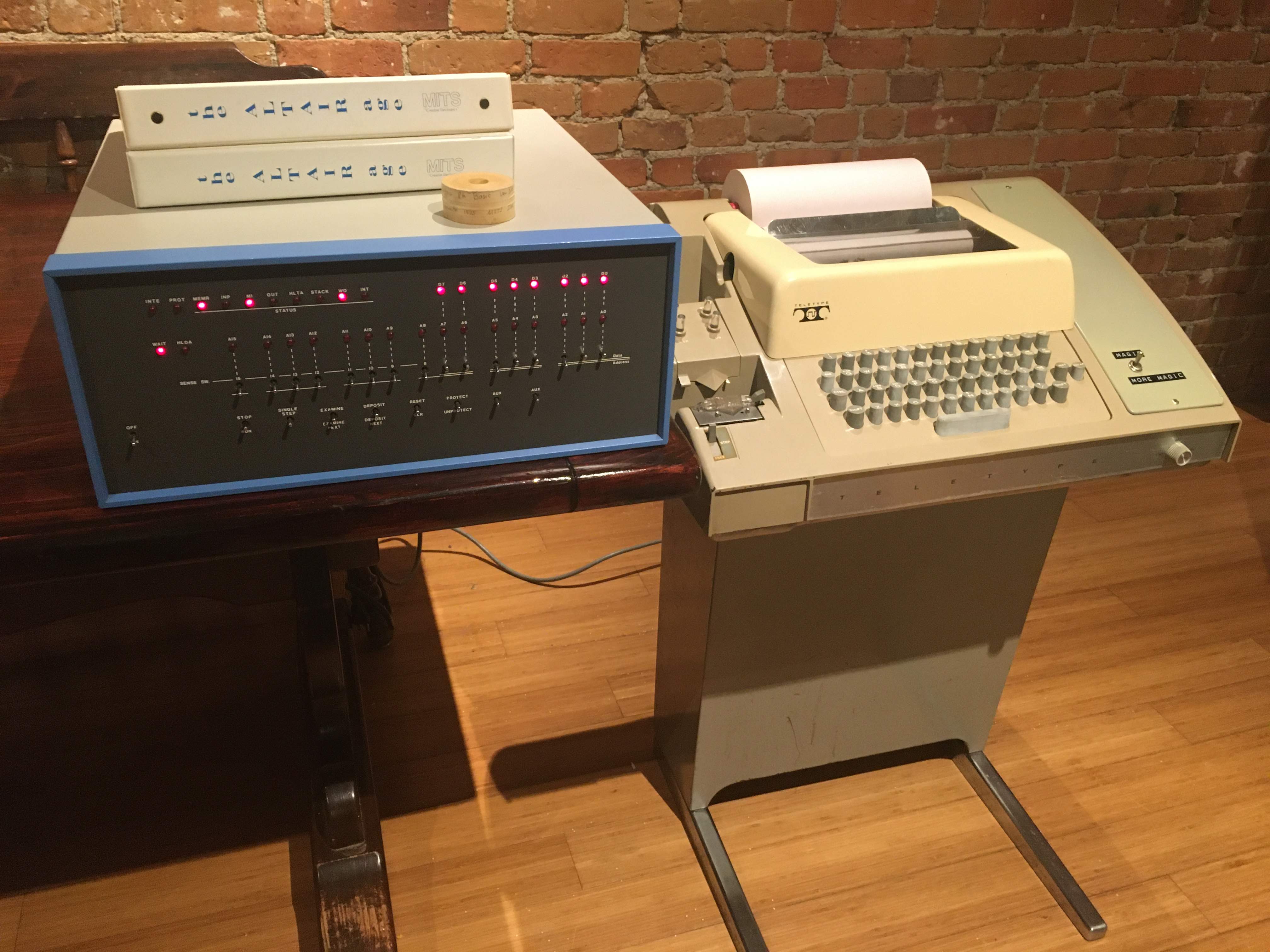
11.4 Games, utilities, and writing assembly
Once a machine could load and run software conveniently, people did with it what people always do: they played, and they built tools. The earliest Altair software culture was a mixture of games typed in from listings, small utilities traded on tape, and — for the more serious — the toolchain for writing one’s own machine code in a humane way.
The games were of their time and of their constraints. Volume 5 dwelt on Kill the Bit, the 24-byte front-panel game that needed no peripheral at all; with a terminal attached, a whole genre of text games opened up. Number-guessing games, Lunar Lander (the famous one where you type burn rates and watch your descent printed line by line), simple Star Trek-style strategy games, blackjack, and a steady supply of BASIC listings printed in the hobbyist magazines for the reader to key in by hand. Typing a game in from a magazine — and then debugging your own typos — was itself a primary way people learned to program. Alongside the games came the utilities: memory tests, tape-duplication helpers, simple text formatters, and the I/O drivers needed to coax a particular brand of terminal or printer into cooperating.
For anyone who wanted to write fast code, or code that did things BASIC could not, the path led to 8080 assembly language, and here the daily workflow deserves a close look because it is the part most unlike modern programming. To write assembly without an assembler is to do by hand what Volume 5 described: work out each instruction, look up its opcode, and toggle or hand-load the bytes. An assembler removes that drudgery. You write the program in mnemonics — MVI A,0 instead of the byte 076 000 — using symbolic names for addresses and variables, and the assembler translates that human-readable source into the machine-code object the processor actually runs. To produce and edit that source you needed an editor: a program that let you type, change, and store lines of text. The editor-and-assembler pair was the working programmer’s core toolkit.
The shape of the workflow followed directly from the storage you had. On a tape-and-terminal machine it was painful but possible: load the editor, type your source, punch or record it to tape, load the assembler, feed your source tape back in, and let it produce an object tape — then load that and run it, and when it failed (it always failed the first time), start the cycle again. Each pass meant minutes of tape. CP/M transformed this completely. On a disk machine the editor (ED), the assembler (ASM), the loader, and a rudimentary debugger (DDT, the Dynamic Debugging Tool) were all just programs on the diskette, each invoked by name from the A> prompt, each reading and writing named files on the same disk. Edit PROG.ASM, assemble it to PROG.HEX, load and test it, drop back to the prompt, edit again. The edit-assemble-test loop that took an afternoon on tape took minutes on a floppy, and that compression — more than any single feature — is what made serious software development on a microcomputer practical at all.
11.5 The loading ritual: tape, paper, and the first floppies
Nothing conveys the texture of daily Altair life better than the act of getting software into the machine, because before you could do anything you had to wait. The waiting was the defining sensation of the era, and it came in several grades.
The slowest grade was paper tape through a Teletype. The Model 33 ASR Teletype — the standard terminal of the early Altair (pictured above) — had a paper-tape reader and punch built in, and it moved data at 110 baud, roughly ten characters a second. A long program on paper tape clattered into the machine for many minutes while the Teletype’s reader chewed steadily through a punched ribbon, the paper feeding off a roll or out of a bin. It was reliable and you could see the tape moving, but it was glacial, and the tapes themselves were bulky and fragile.
Cassette tape was the hobbyist’s faster, cheaper alternative. MITS sold an audio cassette interface, the 88-ACR, which paired a serial board with a small modem daughterboard to turn the machine’s serial data into audio tones an ordinary portable cassette recorder could store — and back again on playback. It ran at 300 baud, about three times the speed of the Teletype’s paper tape, and it used cheap consumer cassettes anyone could buy at a drugstore. The appeal was obvious; the reliability, less so. Cassette audio is finicky, and getting a clean load depended on tape quality, head cleanliness, and even the volume setting on the recorder.
The chaos of incompatible cassette schemes prompted one of the era’s small, important acts of cooperation. In November 1975, Byte magazine convened a symposium in Kansas City, Missouri, to agree on a single standard for storing data on consumer cassettes. The result — written up by Lee Felsenstein and Harold Mauch and published in Byte — became the Kansas City standard. It defined exactly how bits became sound: a “0” was four cycles of a 1200 Hz tone, a “1” was eight cycles of 2400 Hz, framed into 11-bit characters, yielding a data rate of 300 baud — about 27 bytes per second. The arithmetic of that is sobering. At 27 bytes a second, an 8-kilobyte BASIC program took roughly five minutes to load, every single time you wanted to use it, and a misread anywhere meant starting over. The first systems built to the standard appeared in 1976.
The luxury, when it finally came, was the floppy disk. Booting from a floppy was a different experience in kind, not just degree. Where tape is a stream you must wait out from end to end, a disk is addressable: the system reads only the blocks it needs, and it reads them fast. To start a CP/M machine you toggled a tiny bootstrap into the front panel (or, on later machines, let a boot ROM do it), which read the first sector from the diskette; that sector pulled in the rest of the operating system; and within a few seconds the A> prompt appeared. From there, a program loaded from disk in a moment rather than minutes. The five-minute cassette wait collapsed to a brief whir of the drive. For anyone who had spent a year feeding paper and audio tape into the machine, the first floppy boot was a small revelation — the moment the Altair stopped feeling like an experiment and started feeling like equipment.
11.6 What a session actually looked like
Abstractions only go so far; let us sit down at the machine. Picture a fairly well-equipped Altair in 1976: an 8K machine with a serial board and a Teletype, an 88-ACR cassette interface, and a cassette of 8K BASIC. A typical evening’s session went something like this.
You switch on the power supply; the fans spin up and the panel lamps flicker to their cold-start gibberish. The processor is, as always, executing nothing useful, so the first thing you do is what Volume 5 taught: you toggle a short bootstrap loader into memory by hand — a few dozen bytes whose only job is to read BASIC in from the cassette interface. You actuate RESET to point the program counter at the start of your loader, set the cassette recorder to the right spot, press play, and raise RUN. Now you wait. For the next several minutes the machine reads the audio tones off the tape; if you are lucky the load is clean, and if you are not, BASIC comes up garbled or hangs and you rewind and try again. This is the ritual, and every regular user simply built it into the rhythm of the evening — start the load, go make coffee, come back and check.
When the tape finishes, BASIC announces itself. The early versions ask a few setup questions on the Teletype:
MEMORY SIZE? 8192
TERMINAL WIDTH? 72
WANT SIN-COS-TAN-ATN? Y

8191 BYTES FREE
ALTAIR BASIC REV. 4.0
[8K VERSION]
OK
That OK is the threshold. Everything before it was preparation; from here on you are in the machine, typing at the keyboard and reading the Teletype’s printed reply on the roll of paper. You write a short program — say, the obligatory test that proves the thing is alive:
10 FOR I = 1 TO 10
20 PRINT I, I*I
30 NEXT I
40 END
RUN
The Teletype hammers out a neat table of squares, ten lines, the print head slamming back and forth and the paper advancing with a ratchet. You LIST it to check it, change line 20, RUN again. The whole exchange is a conversation conducted at the speed of a printing terminal — ten characters a second of output, so a screenful of numbers takes real, audible seconds to appear. There is no screen to scroll; there is a growing pile of printed paper, a permanent record of everything you and the machine said to each other.
The feel of it is the thing worth holding onto. It is slow by any modern measure, and noisy, and the constraints press on you constantly — eight kilobytes is not much, the Teletype is loud, the cassette is unreliable, and one stray keystroke can lose an unsaved program forever, because on a tape machine there is no saving unless you deliberately record your program back out to cassette. And yet it is responsive in a way the bare machine never was. The Altair answers you. You type PRINT 355/113 and it prints 3.14159 and you grin, because a machine you may well have soldered together yourself is doing arithmetic on command, in a language you can read, in a dialogue you are having right now. When the evening ends you might record your night’s work back to cassette so you do not have to retype it, switch off the power, and watch every lamp go dark — the program in memory gone, but the tape safe in its case for next time.
That was using the Altair, day to day, in the cassette-and-BASIC era. A year or two later, for those who could afford the disks, the same session lost most of its waiting: the bootstrap pulled CP/M off a floppy in seconds, BASIC or an assembler loaded from a named file in a moment, your work saved to disk by name and came back by name, and the edit-run-edit loop tightened from minutes to seconds. The machine itself had not changed — it was the same 8080 on the same S-100 bus behind the same panel of switches and lamps. What changed was everything around it: the language that let you speak to it, the operating system that gave it a memory of its own work, and the storage that finally let a session be something you returned to rather than rebuilt from scratch each night. That accumulation of software and storage around the bare machine is the whole story of how a box of switches became a personal computer — and living through it, one five-minute tape load at a time, is what it actually meant to use the Altair 8800.
Sources
- CP/M — Wikipedia. Confirms CP/M’s origin: written by Gary Kildall beginning in 1974 to run on an Intel Intellec-8 development system fitted with a Shugart Associates 8-inch floppy drive through a custom controller; written in Kildall’s own PL/M; the BIOS/BDOS/CCP architecture that isolated machine-specific code into the BIOS and made CP/M portable across S-100 machines; the
A>console prompt; and CP/M running on ~3000 computer models by the early 1980s. https://en.wikipedia.org/wiki/CP/M - Gary Kildall — Wikipedia. Corroborates the 1974 prototype demonstrated in Pacific Grove, California; the incorporation of “Intergalactic Digital Research” (later Digital Research, Inc.) with Dorothy Kildall; marketing CP/M through hobbyist-magazine advertisements; and Kildall’s authorship of the BIOS concept. https://en.wikipedia.org/wiki/Gary_Kildall
- Digital Research / “50 years ago, CP/M started the microcomputer revolution” (The Register, 2 Aug 2024) and the Computer History Museum’s CP/M history. Used to date and frame Digital Research’s role and CP/M’s significance as the dominant pre-MS-DOS microcomputer operating system. https://www.theregister.com/2024/08/02/cpm_50th_anniversary/ · https://computerhistory.org/blog/fifty-years-of-the-personal-computer-operating-system/
- Kansas City standard — Wikipedia. Source of the cassette-loading details: the November 7–8, 1975 Byte-sponsored symposium in Kansas City, Missouri; the standard written up by Lee Felsenstein (Processor Technology) and Harold Mauch (Percom) and published in Byte; the AFSK encoding (“0” = four cycles of 1200 Hz, “1” = eight cycles of 2400 Hz), 11-bit frames, 300 baud, ~27 bytes/second; the example that a typical 8 KB BASIC program takes about five minutes to load; and first systems appearing in 1976. https://en.wikipedia.org/wiki/Kansas_City_standard
- Altair 8800 Clone (altairclone.com), “Audio Cassette Interface” and “Details” pages, and the virtualaltair.com 88-ACR page. Confirm the MITS 88-ACR as a two-board set (88-SIO serial board plus a modem daughterboard) running at 300 baud versus the Teletype’s 110-baud paper tape, offered as an alternative to paper tape for loading and saving BASIC; and MITS changing the 88-ACR tone frequencies in March 1976 to improve reliability. https://altairclone.com/cassette.html · http://www.virtualaltair.com/virtualaltair.com/vac_88-ACR.asp
- MITS Altair floppy subsystem: the 88-DCDD floppy disk drive (two cross-cabled S-100 boards driving a Pertec drive, with a dedicated 8080 as disk controller), Disk Extended BASIC ready to ship 29 March 1976, and Altair DOS released in 1977 after Pertec’s acquisition of MITS — via the RICM collection notes, the 88-DCDD specifications, and altairclone.com. https://www.ricomputermuseum.org/collections-gallery/small-systems-at-ricm/mits-altair-8800-2 · http://vtda.org/docs/computing/MITS/MITS_AltairFloppyDisk88-DCDD_Specs.pdf
- CP/M on S-100 hardware: IMSAI’s early adoption of CP/M and floppy drives from late 1976 (CP/M 1.3 with the IMSAI floppy controller; the IMDOS variant from early 1977) and Lifeboat Associates’ distribution of CP/M for S-100 floppy systems — via retrotechnology.com’s CP/M and IMSAI history pages and the IMSAI 8080 Wikipedia article. http://www.retrotechnology.com/dri/first_floppy.html · https://en.wikipedia.org/wiki/IMSAI_8080
- Altair BASIC versions (4K, 8K, Extended, Disk Extended), the
MEMORY SIZE? / TERMINAL WIDTH?startup dialogue, and the role of BASIC as the everyday operating environment on cassette-and-Teletype machines — cross-referenced with Volume 7 of this series and the Altair BASIC documentation preserved at altairclone.com. The session transcript in this volume reproduces the standard 8K BASIC startup prompts and a trivial FOR/NEXT demonstration program; the prompt text follows the published Altair BASIC rev. 4.0 startup sequence. https://en.wikipedia.org/wiki/Altair_BASIC - Figure: “Altair 8800 and Model 33 ASR Teletype” by Tim Colegrove, CC BY-SA 4.0, via Wikimedia Commons — an Altair 8800 beside the Model 33 ASR Teletype that served as keyboard, printer, and paper-tape reader/punch in a typical early session. https://commons.wikimedia.org/wiki/File:Altair_8800_and_Model_33_ASR_Teletype.jpg

Comments (0)