Altair 8800 · Volume 12
Altair 8800 — Volume 12 — Surviving Machines, Emulators & Museums
Half a century on, where to see an Altair behind museum glass, how to run one on a laptop, and who keeps the originals — and their software — alive.
12.1 About This Volume
The eleven volumes before this one were a history. They opened the kit’s shipping carton in 1975, traced the 8080 on its card and the hundred-pin bus behind the front panel, taught the toggle-in ritual, followed Altair BASIC out of Albuquerque, and watched the machine light the fuse on an entire industry. That story is finished; the Altair 8800 had its moment, was eclipsed within a few short years by the machines it inspired, and passed into history. This volume is about what happened next — and, more to the point, about the present tense.
Because the Altair did not simply vanish. Fifty years on it occupies a peculiar and rather wonderful afterlife, sustained on three separate fronts by people who refuse to let it go. The originals survive — a few thousand were built, a far smaller number still exist, and the best of them now sit under museum lights or in the climate-controlled rooms of serious collectors, where a working first-generation unit changes hands for more than a good used car. The software survives — the BASIC tapes, the manuals, the disk images, the schematics — digitised, mirrored, and obsessively cross-checked by an archival community that treats a 1975 paper tape as a primary historical document. And the experience survives, in a way no other category of artifact quite manages: through emulators, anyone with a laptop or a web browser can boot a virtual Altair, flip its switches, watch its lamps, and type PRINT 2+2 into a faithful copy of the very interpreter Bill Gates and Paul Allen wrote — without owning a single screw of the real thing.
This is the volume about all three. It is also, deliberately, the hinge from history into hardware revival. Emulators answer the question “what was it like?” completely and for free; what they cannot give you is the object — the blue steel, the real toggles under your fingers, the warmth of the lamps. For a certain kind of enthusiast that absence is unbearable, and the answer is to build one. That is where the next volume goes: Volume 13 is the modern replica revival, and in particular the Altair-Duino — a faithful, affordable reproduction of the front-panel machine, built around modern microcontroller hardware, that has put a working “Altair” on thousands of desks that would never see a real one. The path from this volume to that one mirrors exactly what happened in the PDP-8 world, where decades of SIMH-based software preservation eventually handed off to Oscar Vermeulen’s PiDP-8/I replica. Preservation keeps the soul; the replica gives it a body. First, then, the soul — the machines, the emulators, and the archives that keep it.
12.2 Where to see an Altair today
Start with the places that hold the real thing, because surviving Altairs are scarcer than their fame suggests. MITS built the machine in the low thousands — enough to start a revolution, not enough to flood the world — and the kits that were soldered together in 1975 had a hard life: modified, expanded, cannibalised for parts, or simply thrown out when their owners moved on to an Apple or a TRS-80. A complete, original, unmolested Altair 8800 is genuinely rare, and the institutions that hold one treat it accordingly.
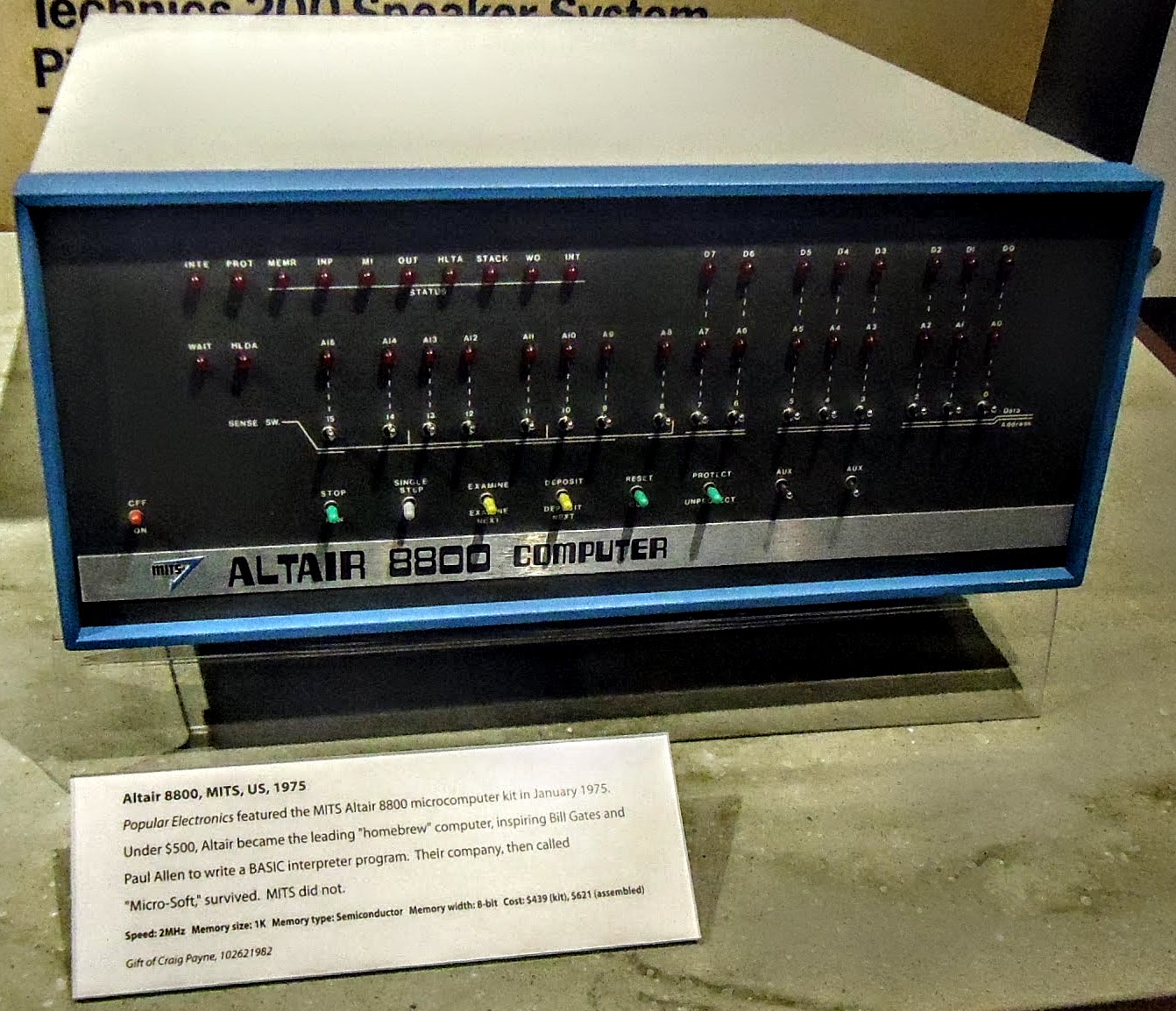
The flagship is the Computer History Museum in Mountain View, California — the world’s largest institution devoted to computing history, and the natural home for the machine that began personal computing. The Altair appears in CHM’s permanent Revolution exhibition, in the gallery on the birth of the personal computer, presented not as a curiosity but as a turning point: the moment a real, programmable computer became something an individual could own. To stand in front of it is to see the actual blue box from the Popular Electronics cover, the switches and lamps that Volume 5 described as an operator’s entire world, behind glass.
On the opposite coast, the Smithsonian Institution holds Altairs in the National Museum of American History’s computing collections. What makes the Smithsonian’s holdings interesting is the curatorial choice behind them: rather than preserve a pristine base unit, the museum collected an Altair precisely as a hobbyist would have used it — outfitted with the additions that turned the bare kit into a working system, including a user-added keyboard, a monitor, a disk drive, and a stack of plug-in S-100 boards. It is a deliberate document of the machine in its lived state, the soldered-and-expanded reality rather than the showroom ideal.
Between these two poles sits a more bittersweet chapter: the Living Computers legacy. Living Computers: Museum + Labs, founded in Seattle by Microsoft co-founder Paul Allen and opened to the public in October 2012, was for a decade something no other institution offered — a museum of running vintage computers, where visitors could sit down and actually operate the machines, Altairs included, rather than peer at dark exhibits. It was the closest thing the world had to a place where you could touch the real history. Its end was abrupt. The museum closed to the public in early 2020 and never reopened; in 2024, following Allen’s death, his estate permanently shuttered Living Computers and dispersed its collection, with significant pieces sent to auction. The closure was a genuine loss to the preservation community and a sharp reminder that even well-funded institutions are mortal — that the survival of these machines depends, ultimately, on people who care, and that when the people or the money go, the artifacts scatter.
Beyond the big names, surviving Altairs live in a diffuse network of smaller institutions and private hands — the Vintage Computer Federation’s events and collections, regional computer museums, university holdings, and a community of serious private collectors who, between them, probably preserve more working Altairs than all the museums combined. Which leads naturally to the question every visitor eventually asks at the glass: what is one of these actually worth?
12.3 The collector market
A great deal, as it turns out, and increasingly so. The Altair 8800 has become a blue-chip artifact of computing history, and its prices reflect both genuine scarcity and the symbolic weight of being the first. The numbers are worth setting down plainly, because they are striking against the machine’s original cost: in 1975 the Altair sold for $439 as a kit or $621 assembled. Today an original commands many multiples of that even after fifty years of inflation.
Auction records tell the story. Originals have sold in the low-to-mid four figures and climbed from there — an Altair 8800 realised over $3,000 at RR Auction, while Bonhams sold a well-equipped unit, complete with a stack of modules, for above $8,000 including premium. Functioning original machines routinely change hands for upwards of $4,000, and the best examples — complete, original, working — reach toward $9,000. The premium cases are the unbuilt ones: a sealed, original, never-assembled Altair kit is a near-mythical object, a 1975 time capsule, and one such kit sold for $7,500 — buyers paying a premium precisely not to have a working computer, but to own an untouched piece of the moment.
That market has, predictably, created a thriving ecosystem around it. There is a restoration community of considerable skill — people who track down dead Altairs, recap the power supplies, repair or remake the front-panel boards, source period-correct S-100 cards, and coax a half-century-old machine back to life. Restoration is delicate work: original parts are scarce, the boards are hand-assemblable but unforgiving, and a “restored” machine occupies a careful middle ground between preservation (keep it original, even if dead) and revival (make it run, even if it means new parts). And alongside the originals runs a parallel market in replicas and clones, which exists precisely because originals are rare and expensive. The most ambitious of these is Mike Douglas’s Altair 8800 Clone (and its later S-100-bus “8800c”), a faithful reproduction built from modern components for people who want a genuinely period-accurate machine without paying original-Altair prices or risking irreplaceable hardware. The relationship between originals, restorations, and replicas is the central tension of the whole hobby — and the replica side of it is so rich a story that it gets its own volume next.
12.4 Emulators: running an Altair without an Altair
If the originals are scarce and costly, the experience of the Altair is now nearly free, and astonishingly faithful. Software emulation has done for the Altair what it has done for few other vintage machines: reproduced not just the processor but the front panel itself — the switches, the lamps, the whole tactile ritual of Volume 5 — so completely that you can learn the toggle-in procedure, enter Kill the Bit byte by byte, and watch the lit bit travel around a row of simulated LEDs, all on a modern screen.
The two pillars of serious Altair emulation are SIMH AltairZ80 and Altair32, and they aim at different things.
SIMH AltairZ80 is the scholarly workhorse. SIMH (the Computer History Simulation Project) is a long-running, open-source framework for emulating historic computers, and its Altair module — altairz80 — is one of its most developed. The original Altair simulator was written by Charles (“Chuck”) Owen, and an enhanced, actively maintained branch is kept by Peter Schorn. Despite the “z80” in the name, the simulator is not limited to the Z80: it can be configured to run the original 8080, the Z80, and — as later enhancements that go well beyond any real Altair — even the 8086 and Motorola 68000, making it a general-purpose S-100-era machine as much as a strict Altair. It models banked memory (sixteen banks of 64 KB), hard-disk controllers, and the peripherals of period S-100 systems such as North Star and Vector Graphic, which is what lets it boot CP/M and run a startling amount of genuine 1970s and 1980s software. AltairZ80 is text-based — it presents the machine as a console session rather than a graphical panel — which makes it the tool of choice for actually doing work: booting CP/M, running Altair BASIC, or loading historic disk images. For the historian or the tinkerer who wants the machine to run programs, this is the reference emulator, and it runs on Windows, macOS, and Linux alike.
Altair32 comes at the problem from the other side: fidelity to the front panel. It is a Windows emulator (which also runs well under Wine on macOS and Linux), hosted on the classiccmp.org community servers, and its distinguishing feature is a detailed graphical reproduction of the Altair’s face — the switches and lamps rendered on screen so that you operate the virtual machine exactly as you would the real one, flipping address switches and reading the LEDs. It uses standard Altair disk-image formats and ships with a built-in VT100 terminal (with the option of talking over a real serial port), so it can both feel like an Altair and run like one. Its active development tapered off in the mid-2000s, but it remains a beloved and widely used way to experience the panel without the hardware.
Around these two sit a constellation of other simulators, each illuminating a different facet. Z80pack, the work of Udo Munk, includes altairsim with a handsome graphical front panel and is a favourite of the Unix-minded. In the early 1990s — remarkably early — Claus Giloi wrote a Windows software emulation of the front panels of the Altair 8800b and the IMSAI 8080, faithful right down to the lamps, the toggles, and the power switch. And the most accessible of all are the browser-based simulators: pure-JavaScript Altairs that run in any web browser with nothing to install, such as the well-known open-source 8800 front-panel simulator that recreates the toggle-in operations on a web page. These browser sims are, in a sense, the purest distillation of the preservation impulse — the Altair experience reduced to a URL, so that a curious student anywhere in the world can flip its switches in the time it takes to load a page.
What every one of these tools shares is that they model the things Volumes 4 and 5 described as hardware: the 8080 (or Z80) processor and its instruction set; the front panel of switches, address/data lamps, and status LEDs; and the peripherals — paper tape, serial terminals, and S-100 disk controllers — that turned the bare machine into a usable system. Run Altair BASIC under AltairZ80 and you are executing, instruction for instruction, the same interpreter that shipped on paper tape in 1975; the emulator is faithful enough that the historic software simply works. That fidelity is only possible, of course, because someone preserved the software in the first place.
12.5 Preserving the software and the manuals
An emulator is an empty stage without the software to run on it, and a museum piece is mute without the manual that explains it. The quieter, less glamorous, and arguably most important preservation work of all is therefore archival: the patient digitising and mirroring of every Altair artifact that can be found — the BASIC paper tapes, the operator’s and assembly manuals, the schematics, the price lists, the disk images, the dealer newsletters. This is the documentary record that makes everything else possible, and it is sustained by a small community of dedicated archivists.
The cornerstone is bitsavers (bitsavers.org), the vast, plain, indispensable archive of historic computing documentation. Its MITS section holds scanned PDFs of the primary Altair literature — the Altair 8800 BASIC reference manuals, the operator’s and assembly manuals, MITS price lists, the Altair Computer Report, dealer letters, and more — mirrored onto the Internet Archive for redundancy. Bitsavers is the kind of resource that is easy to take for granted and impossible to replace: it is where, throughout this series, the primary-source verification ultimately bottoms out. When a fact about the Altair needs checking against what MITS actually printed in 1975, bitsavers is usually where the printed page lives.
The software side is anchored by Mike Douglas, whose work spans both hardware and preservation. In the course of designing his Altair 8800 Clone (2012 onward), Douglas hunted down and digitised an enormous quantity of original Altair documentation and software, produced instructional videos, and made it all freely available through the Altair-clone project (altairclone.com) and his personal archive at deramp.com. The MITS disk and hard-disk images that let an emulated or cloned Altair boot CP/M and run period software were, in large part, his doing — created, verified, and published so that the living machines (real, cloned, or emulated) have something authentic to run. Douglas is, in this sense, the connective tissue of the whole modern Altair scene: a restorer, a replica-maker, an archivist, and a teacher at once, and a recurring name in the sources of this and neighbouring volumes.
Around bitsavers and deramp runs the broader retro-computing community that gives this work its momentum: the Vintage Computer Federation and its forums, where restorations are documented and knowledge is pooled; the Internet Archive, which mirrors and timestamps the scans; and the countless individual hobbyists who transcribe manuals, cross-check octal listings (the Kill the Bit verification in Volume 5 drew on exactly this kind of community work), and post their findings. It is unglamorous, largely unpaid, and quietly heroic — and it is the reason that a machine built in the low thousands, fifty years ago, can be experienced today in more depth, by more people, than when it was new.
12.6 From preservation to revival
Set the three threads side by side and the shape of the Altair’s afterlife comes clear. The museums and collectors keep the originals — the irreplaceable physical artifacts — safe but, of necessity, behind glass or behind a steep price. The emulators give the experience away for nothing, perfectly faithful in everything except the one thing they cannot supply: the object itself. And the archivists keep the software and the documents alive so that both the museums’ machines and the emulators’ virtual ones have something real to run and something true to be checked against. Together they have made the Altair 8800 one of the best-preserved computers in history.
But preservation, for all its devotion, leaves one hunger unanswered. An emulator on a laptop, however accurate, is glass and pixels; a museum Altair, however real, cannot be touched. For the enthusiast who has watched the simulated lamps and read every scanned manual and still wants to put real switches under real fingers — who wants the thing, not the picture of the thing, and cannot justify (or find) a nine-thousand-dollar original — there is exactly one good answer: build a replica. That impulse, and the remarkable modern hardware that satisfies it, is the subject of Volume 13. We turn next to the Altair-Duino — a faithful, affordable, working reproduction of the front-panel machine — and to the revival community that has given the Altair 8800 not just an afterlife in archives and emulators, but a second life in steel and lamps on thousands of desks.
Sources
- Peter Schorn, “Altair 8800 / AltairZ80 Simulator.” Primary source for the SIMH-family AltairZ80 simulator: confirms it is part of SIMH, that the original simulator was written by Charles Owen and the enhanced version is maintained by Schorn, that it can run the 8080, Z80, 8086, and 68000 processors, and that it models banked memory (16 × 64 KB), hard disks, and S-100 peripherals (North Star, Vector Graphic) to run CP/M. https://schorn.ch/altair.html
- SIMH / Computer History Simulation Project — AltairZ80, distributed via the Internet Archive and bitsavers (e.g., the SIMH “8080, Z80, and 8086 Microcomputers Simulator Configuration” documentation). Confirms altairz80’s place in SIMH, the multi-CPU capability, and that the “z80” name notwithstanding it emulates the 8080 equally well. http://bitsavers.trailing-edge.com/simh.trailing-edge.com_201206/altairz80.html · MajorGeeks download listing (AltairZ80 4.1) https://www.majorgeeks.com/files/details/altair_8800_simulator.html
- Altair32 emulator, hosted at altair32.classiccmp.org. Source for the Windows graphical front-panel emulator: confirms it reproduces the Altair front panel, uses standard Altair disk formats, includes a built-in VT100 terminal with optional serial-port access, runs under Wine on macOS/Linux, and that active development tapered in the mid-2000s. http://altair32.classiccmp.org/
- “Altair 8800 notes,” ldx.ca, and the Altair-Duino community summary of emulators (Google Groups). Corroborates the landscape of Altair emulators — SIMH altairz80 (text-based), Z80pack/altairsim (Udo Munk, graphical front panel), Claus Giloi’s early-1990s Windows 8800b/IMSAI front-panel emulator, Altair32, and browser-based JavaScript simulators. https://www.ldx.ca/notes/altair-8800-notes.html · https://groups.google.com/g/altair-duino/c/yxEY5oj51RA
- wixette, “8800-simulator” (GitHub) — an open-source JavaScript simulator demonstrating the front-panel operations of the Altair 8800 in a web browser, cited as the exemplar browser-based simulator. https://github.com/wixette/8800-simulator
- Computer History Museum, “Altair 8800” (CHM Revolution exhibition, Personal Computers gallery). Confirms the Altair on display at CHM in Mountain View and its framing as the founding machine of the personal-computer era. https://www.computerhistory.org/revolution/personal-computers/17/312/1140
- Smithsonian Institution / National Museum of American History, “Altair 8800 Microcomputer.” Confirms the Smithsonian’s holdings and the curatorial choice to collect an Altair outfitted as a hobbyist used it — with an added keyboard, monitor, disk drive, and multiple plug-in S-100 boards. https://americanhistory.si.edu/collections/object/nmah_334396
- Wikipedia, “Living Computers: Museum + Labs,” and GeekWire, “They gave machines to Living Computers for preservation, but museum’s closure is a bitter end” (2024). Source for the Living Computers legacy: founded by Paul Allen, opened to the public October 2012, closed to the public in 2020 and never reopened, and permanently shuttered by Allen’s estate in 2024 with its collection dispersed/auctioned. https://en.wikipedia.org/wiki/Living_Computers:_Museum_%2B_Labs · https://www.geekwire.com/2024/they-gave-machines-to-living-computers-for-preservation-but-museums-closure-is-a-bitter-end/
- Auction and market records: RR Auction (MITS Altair 8800, realised over $3,000), Bonhams (Altair 8800 with modules, above $8,000 incl. premium), and collector/eBay reports (functioning units $4,000+, up to ~$9,000; sealed unassembled kit ~$7,500). Establishes current collector values against the 1975 prices of $439 (kit) / $621 (assembled). https://www.rrauction.com/auctions/lot-detail/344684706157011-mits-altair-8800-computer/ · https://www.bonhams.com/auction/24495/lot/108/
- Mike Douglas, Altair 8800 Clone project (altairclone.com) and personal archive (deramp.com). Source for software/manual preservation and the clone/8800c replicas: confirms Douglas digitised and published Altair documentation, instructional videos, and the MITS disk/hard-disk images used by emulated and cloned Altairs, and built a full S-100 reproduction from modern parts. https://altairclone.com/ · https://deramp.com/
- bitsavers (bitsavers.org), MITS section, mirrored on the Internet Archive. The primary documentation archive: scanned Altair 8800 BASIC reference manuals, operator’s/assembly manuals, MITS price lists, and the Altair Computer Report. http://www.bitsavers.org/pdf/mits/ · https://archive.org/details/bitsavers_mitsAltairceJul77_9357641
- Figure: “Altair 8800 computer at CHM” by Tomwsulcer, released CC0 (public-domain dedication), via Wikimedia Commons — a surviving MITS Altair 8800 on display at the Computer History Museum. https://commons.wikimedia.org/wiki/File:Altair_8800_computer_at_CHM.jpg

Comments (0)